Clean Out Your Computer Day is celebrated on the second Monday in February. In honor of this day let's spend some time on our computers getting things nice and organized!

Your Supplies
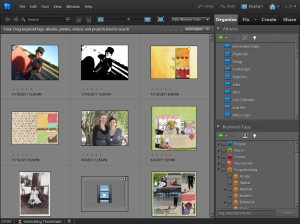
How to ensure all your files are in Photoshop Elements Organizer
Use my simple approach to clean up your Organizer and ensure all photos are on your Hard Drive and in Organizer.
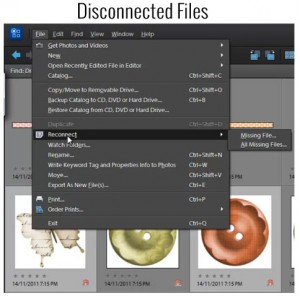
Disconnected Files in Photoshop Elements Organizer
Have you moved any of your files outside of Photoshop Elements Organizer? Maybe you moved some of your digital supply file folders at a time when you weren't using Organizer.
Organizer won't automatically recognize the move. When you next use Organizer, you may get a message that some files were "disconnected".
Learn how to reconnect those missing files.
A Simple Process for Downloading and Backing Up Digital Scrapbooking Files
First things first - your workflow for downloading and unzipping your scrapbooking supplies is up to you!
But since I've been doing this for nearly 8 years, I've refined and streamlined my process and I want share it with you today.
Here's how I download, unzip and back up my supplies.
Learn More with My Class Get Organized: Supplies
You can organize your photos and supplies in minutes not hours, and all you need is Photoshop Elements. There's no converting, no endless tagging and no lost and corrupted files.
I know you'll be ecstatic when you have your supplies at your fingertips and put your software to work for you.
Register today to see how Photoshop Elements can do the work for you.
Your Photos
Why your photos aren’t slowing down your computer
Have you ever sat staring at the spinning cursor or beachball or hourglass, waiting for your computer to just. open. the. file?
Have you ever thought, maybe all these 40 000 photos are slowing down my computer? Maybe I should move them off onto an external hard drive? Learn why photos aren't slowing down your computer.
Overwhelmed? I'm here to help!
They're everywhere. On phones, cameras, tablets, hard drives, CDs, DVDs, flash drives and more!
As scrapbookers, we take more photos than the average person and with the proliferation of cameras, it can get a little bit much. One day you spend too many hours searching for that one photo you know you have.
I know that organizing digital photos seems like a huge task and you never quite know where to start.
If you are feeling overwhelmed with photos... here's a choose your own adventure guide to help you get them under control.
How Much Hard Drive Space Will Photoshop Elements Take?
Are you running out of hard drive space? Worried that Photoshop Elements is taking up all your free space? Learn more about how much space Photoshop Elements truly takes.
Learn More with My Class
Have you got a camera, smart phone, DVDs of scanned images or all of the above? If you feel like you have so many photos you don't know what to do you are in the right place. With a little help from me, you will create a system so that your favorite photos are easy to find.
Register today to see how Photoshop Elements can do the work for you.
Happy Clean Out Your Computer Day!

I am an Amazon affiliate so may receive a commission if you make a purchase.


Leave a Reply