
Digital Scrapbooking HQ

Learn to Scrapbook Using Your Computer

  • Blog
  • Classes
  • Book Melissa
  • About
  • Contact

Week in the Life: Wrapping it up

November 3, 2014 By Melissa Shanhun 7 Comments

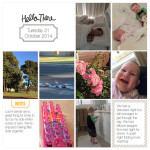
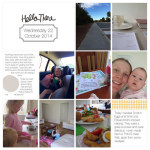
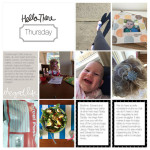
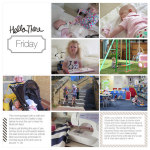
week-in-the-life-with-the-project-life-app

Tmake it mondayoday I'm sharing the last day and cover in my Week in the Life 2014 album as part of the Make it Monday blog hop. If you didn't arrive from Karen's post remember to check it out.

Sunday
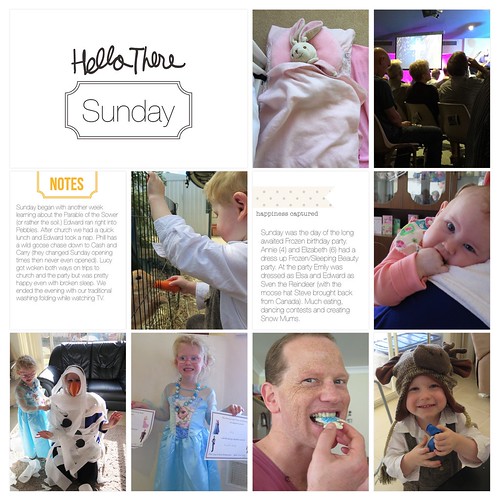
LOAD27 WITL Day 7

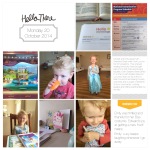
Sunday began with another week learning about the Parable of the Sower (or rather the soil.) Edward ran right into Pebbles. After church we had a quick lunch and Edward took a nap. Phill has a wild goose chase down to Cash and Carry (they changed Sunday opening times then never even opened). Lucy got woken both ways on trips to church and the party but was pretty happy even with broken sleep. We ended the evening with our traditional washing folding while watching TV.

Sunday was the day of the long awaited Frozen birthday party. Annie (4) and Elizabeth (6) had a dress up Frozen/Sleeping Beauty party. At the party Emily was dressed as Elsa and Edward as Sven the Reindeer (with the moose hat Steve brought back from Canada). Much eating, dancing contests and creating Snow Mums.

Cover
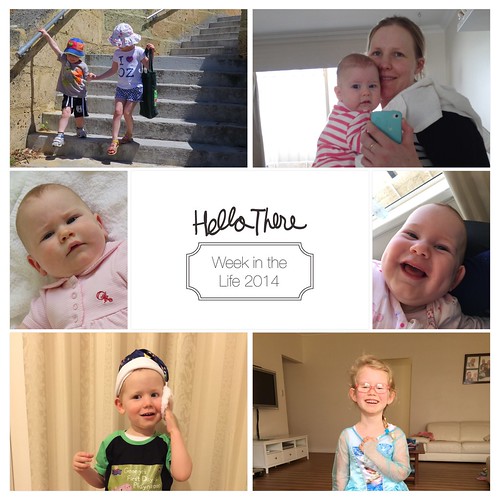
Untitled

Just a simple snapshot of us. I need to find one of Phill that suits, but thankfully with digi scrapping it's easy enough to just change up one of the photos.

The Whole Album
 

Week in the Life with the Project Life App


The process

Here's how the process worked:

  1. Snap photos on my phone
  2. Snap photos on my camera (Canon G16) and upload them automatically using my Eye Fi card
  3. Jot notes about my schedule on Hello Mornings worksheet (Ali's daily sheets are perfect for WITL, but I was already using Hello Mornings ones each day)
  4. Write a few notes about my day in a journal.
  5. Pull my phone photos into the Project Life App
  6. Browse my camera photos on  the Crashplan App (or the Flickr App depending on the day!) and save them to my phone.
  7. Make the page in the Project Life App. Here's my tutorial
  8. I selected the Midnight kit to keep the pages simple - no color clashing to worry about!
  9. Save as a 12x12

Now I've completed my album, I'm tossing up about adding some extra photo collage pages. I'll probably order it as a softcover book as it's pretty short and sweet.

Other Finished Albums

Over the past few years I've participated in Ali Edward's Week in the Life. I've written about a few ideas I had for doing it digi style, but this year I'm simplifying further going to a pocket style page with the Project Life App. In 2011 and 2012 I created a simple hybrid album, which you can see here.

Care to Share?

I'd love see your album, or a page you've made recently - just add an image to the comments below.

Make it Monday

Next in the Make it Monday hop is Kristie Sloan who shows how to create a background using a blended ink technique.

Happy Scrapping!

Melissa1

PS Here's the full Make it Monday Hop

GinaZee: What did Gina do to fix last weeks tag?

Karen is sharing a layout she created by scraplifing someone else's layout.

Kristie Sloan shows how to create a background using a blended ink technique.

Alice Boll has a BRILLIANT trick for using a postcard on a layout.

Beth Soler is sharing how her 30 days of thankful album is all ready to go

Connie's sharing cute lamb party papercrafting goodies - they're BAA-bulbous!

Jen Wright is showing us 2nd part of a double-layout template for free!

PPS This post may contain affiliate links which won’t change your price but will share some commission.

See my favourite things in the Digi Scrap HQ Store at Amazon.

I am an Amazon affiliate so may receive a commission if you make a purchase.

Filed Under: Digital Scrapbooking, Inside My Album, Week in the Life Tagged With: Ali Edwards, Crashplan, Flickr, Liz Tamanaha, Midnight Edition, project life, Project Life app, Week in the Life

About Melissa Shanhun

Melissa Shanhun is a Aussie mum of four and avid digital scrapbooker. She loves to show others how fun and easy it can be to record your precious memories with tech tools like Photoshop Elements.

Comments

  1. Libby Wiers says

    November 4, 2014 at 5:37 am

    You make quick albums/books look easy! And you get such great photos of your lovely family…

    Reply
    • Melissa Shanhun says

      November 4, 2014 at 8:36 am

      Thanks Libby it was actually as easy as it sounds! I’ve just got to fix my typos and order it now!

      Reply
  2. Kristie Sloan says

    November 4, 2014 at 7:09 am

    I always love to see your pages, and really enjoyed your process list. Thanks for sharing!

    Reply
    • Melissa Shanhun says

      November 4, 2014 at 8:36 am

      Thanks Kristie 🙂 keeping it simple this time!

      Reply
  3. Beth says

    November 4, 2014 at 9:07 pm

    I love it Melissa and I am so glad that I attempted this project courtesy of your first post about week in the life. I love how you did everything with the app. I think I might try it that way next year!

    Reply
  4. chile_chicken says

    November 6, 2014 at 4:18 pm

    Love the clean and simple look of this album, well done! Lauren M.

    Reply
    • Melissa Shanhun says

      November 7, 2014 at 3:31 pm

      Thanks Lauren! 🙂

      Reply

Leave a Reply Cancel reply

Your email address will not be published. Required fields are marked *

G’day! I’m Melissa


G’day, I’m Melissa, Aussie mum and digital scrapbook educator. I'm here to help you pair your photos with memories (and fun supplies!) and create your own photo books.
Click Here to Get Started

Search

Youtube

Join us on Facebook

On the Site

ABCs of PSE Adobe Photoshop Adobe Photoshop Elements affiliate Ali Edwards Becky Higgins Christmas Christmas Album Christmas layout ideas Christmas scrapbook Crafts December Daily December Daily Inspiration December Down Under Digital Scrapbook digital scrapbooking digital scrapbook pages Forever giveaway Holiday Faves interview keyboard shortcuts Lain Ehmann Nettio Designs photobook photobooks photo books photo editing Photoshop Photoshop Elements Photoshop Elements Organizer Podcast project life Project Life app PSE13 PSE2021 Scrapbook Scrapbooking Shutterfly templates tools Tutorial tutorials Week in the Life Workshop

Copyright © 2026 Melissa Shanhun 2011-2023

I wish to acknowledge the traditional custodians of the land I live and work on, the Whadjuk (Perth region) people. I acknowledge and respect the continuing Noongar culture and the contribution they make to the life of this city and this region.

Privacy policy

As an Amazon Associate I may earn from qualifying purchases.

We use cookies on our website to give you the most relevant experience by remembering your preferences and repeat visits. By clicking “Accept”, you consent to the use of ALL the cookies.
Do not sell my personal information.
Cookie SettingsAccept
Manage consent

Privacy Overview

This website uses cookies to improve your experience while you navigate through the website. Out of these, the cookies that are categorized as necessary are stored on your browser as they are essential for the working of basic functionalities of the website. We also use third-party cookies that help us analyze and understand how you use this website. These cookies will be stored in your browser only with your consent. You also have the option to opt-out of these cookies. But opting out of some of these cookies may affect your browsing experience.
Necessary
Always Enabled
Necessary cookies are absolutely essential for the website to function properly. These cookies ensure basic functionalities and security features of the website, anonymously.
CookieDurationDescription
cookielawinfo-checkbox-analytics11 monthsThis cookie is set by GDPR Cookie Consent plugin. The cookie is used to store the user consent for the cookies in the category "Analytics".
cookielawinfo-checkbox-functional11 monthsThe cookie is set by GDPR cookie consent to record the user consent for the cookies in the category "Functional".
cookielawinfo-checkbox-necessary11 monthsThis cookie is set by GDPR Cookie Consent plugin. The cookies is used to store the user consent for the cookies in the category "Necessary".
cookielawinfo-checkbox-others11 monthsThis cookie is set by GDPR Cookie Consent plugin. The cookie is used to store the user consent for the cookies in the category "Other.
cookielawinfo-checkbox-performance11 monthsThis cookie is set by GDPR Cookie Consent plugin. The cookie is used to store the user consent for the cookies in the category "Performance".
viewed_cookie_policy11 monthsThe cookie is set by the GDPR Cookie Consent plugin and is used to store whether or not user has consented to the use of cookies. It does not store any personal data.
Functional
Functional cookies help to perform certain functionalities like sharing the content of the website on social media platforms, collect feedbacks, and other third-party features.
Performance
Performance cookies are used to understand and analyze the key performance indexes of the website which helps in delivering a better user experience for the visitors.
Analytics
Analytical cookies are used to understand how visitors interact with the website. These cookies help provide information on metrics the number of visitors, bounce rate, traffic source, etc.
Advertisement
Advertisement cookies are used to provide visitors with relevant ads and marketing campaigns. These cookies track visitors across websites and collect information to provide customized ads.
Others
Other uncategorized cookies are those that are being analyzed and have not been classified into a category as yet.
SAVE & ACCEPT