By far the most common question I get about Photoshop Elements each year is whether or not to upgrade each year. Let's look at your current version and your photo editing needs to see if you should upgrade. Watch my video to see what I recommend.
You can see all the new features in my Photoshop Elements 2025 review, the highlights this year are:
- Open from Mobile
- Remove Object Tool
- Combine Photos Guided Edit
- Depth of Field Guided Edit
- Change Object Colour

In the US, Photoshop Elements costs $99.99 and the upgrade saves you around $20. You can upgrade from any previous version of Photoshop Elements, not just the most recent version.
There's now a US$79.99 education edition of the Photoshop Elements & Premiere Elements set.
Photoshop Elements is sold on a three year license, so once you have a bought it you can use for three years. You'll receive bug fixes and performance improvements during the initial two years through regular dot updates (eg 2025.1, 2025.2 etc), although new feature updates will not be provided. So for PSE2025, you'll have updates until October 2026. You will still a big saving compared to monthly fees for Photoshop CC if you use Photoshop Elements for the full 3 years.
As always you will be able to install it on two computers. Even if you get a new computer, you'll have a free Adobe login and you can always find your licence key and the software downloads there if you need to reinstall it.
At the end of the three years, you will have the option to purchase the latest version upon the expiration of Term License. This is not a subscription model, and an upfront payment will be required to use the application for the three-year period.
The license is non-renewing — it expires 3 years after redemption at which time the Editor will no longer be accessible, but the Organizer will continue to be accessible indefinitely.
Is Your Computer Ready?
Windows
Adobe Photoshop Elements requires Microsoft Windows 10 (version 22H2) or Windows 11 (version 23H2), 64-bit versions only; Windows 7, Windows 8.1 not supported
Mac
Photoshop Elements needs macOS 13, macOS 14 (14.4 or later)
Should You Upgrade?
Once you have checked that you are able to run the newest version on your computer now, we can see if you should upgrade!
Upgrade if you are using a version without a year in the name.
If you have Photoshop Elements 15 or earlier, it's time to upgrade! So many new features have been added in the last 6 versions. Plus, the program is now designed for 64-bit systems and make better use of your RAM.
Photo Editing

If you use Photoshop Elements to edit your photos and have Photoshop Elements 2020 or older, I'd recommend upgrading this year. There are now around 70 guided edits, layer groups, adjust facial features, support for HEIC and HEVC files and performance improvements galore.
Upgrade from Photoshop Elements 2020 or older.
Moving Photos
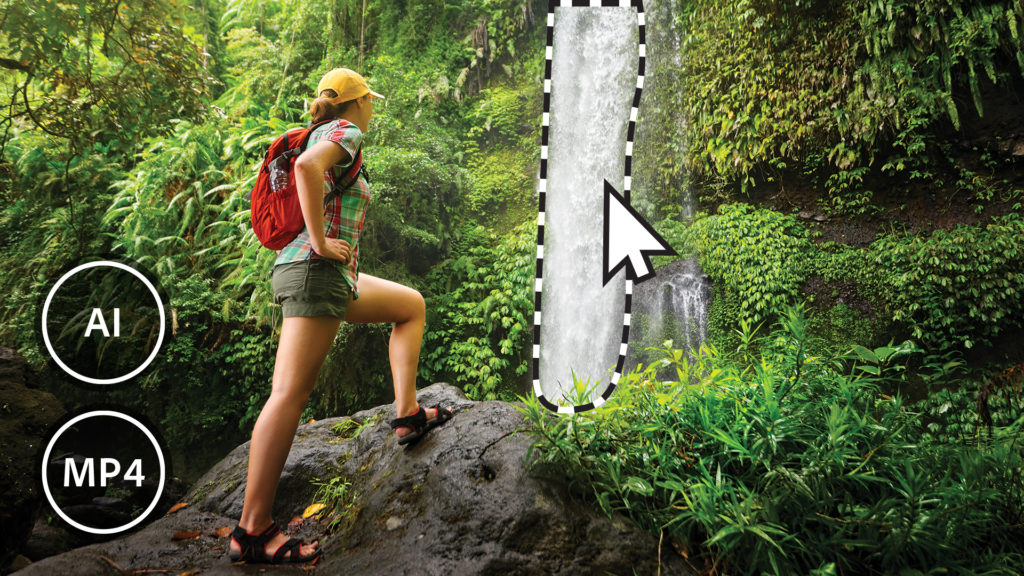
In Elements 2023, Adobe introduced Moving Elements, a feature that will allow you to bring a touch of movie magic to any photo. Select the area to animate, choose the direction, adjust the speed, and then save your photo as an MP4 or GIF to share on social. In 2025, there were even more improvments with audio added to moving photos.
Upgrade from Photoshop Elements 2022 or older for the moving photo enhancements.
Video Slideshows

You can create video slideshows in Photoshop Elements, and this year several new animated slideshow styles to choose from in Photoshop Elements. If you often make slideshows, this is the year to upgrade.
Upgrade from Photoshop Elements 2021 or older for improved video slideshows.
Video Editing

If you would like to do more than just create slideshows with your family video, I do recommend Premiere Elements.
If you use the video editor regularly, this version is worth the upgrade, there's a host of new features:
- New Simplified Timeline
- Color Correction & Grading
- New Titles, Effects and Transitions
- Native Support of Apple Silicon
- Automatic Highlights
- Artistic effects for your videos
- New audio tracks
- New slideshow templates
- Faster launch times
Upgrade from Premiere Elements 2022 or older.
Photo Organizer
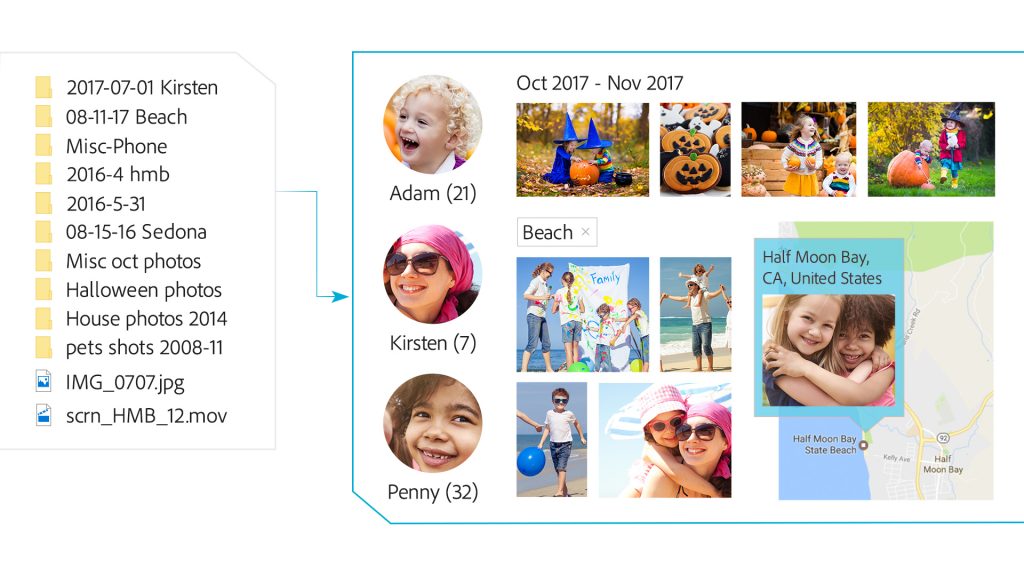
If you use the Organizer 2018 or earlier, this year is the year to upgrade! You'll have maps, and improved people view, automatic catalog backups.
Automated Video Tagging: Organizer can automatically add keyword tags (smart tags) to videos. When you search for a tag in a video, the video will play from the point where the item tagged appears.
Consider upgrading from any previous version if you find that Organizer is a little slow for you (and you have a minimum of 8Gb of RAM). There are big performance improvements each year, plus you can just convert your existing catalog for use in the newer version.
Upgrade from Photoshop Elements 2018 or older.
Web Companion & Phone Apps

If you want to upload your photos, edit on the web or access your photos on different devices you'll want to upgrade to Photoshop Elements 2025.
In the Web Companion you can view and download photos and videos, plus make slideshows and photo collages. If you purchase Photoshop Elements 2024, you automatically have access to Elements Web Companion. Elements Web can be accessed at http://elements.adobe.com/. You can watch my video here for more information.
You can also use Photoshop Elements 2025 and the mobile app on Android and iOS to instantly open phone photos or you can sync them to your Adobe Cloud storage (2Gb storage is included with Photoshop Elements 2025).
Upgrade from Photoshop Elements 2022 or older.
Where to Purchase Photoshop Elements
You can purchase Photoshop Elements from Amazon here. To get upgrade or educational pricing, head to Photoshop Elements & Premiere Elements from Adobe.
Happy upgrading!

PS If you are looking for another alternative that's still on a perpetual license check out Forever Artisan or Paintshop Pro
PPS Pin this for later!
I am an Amazon affiliate so may receive a commission if you make a purchase.
This post contains affiliate links. This means that if you click through that link and purchase an item, I may receive a commission for referring the sale.
I only recommend classes and products that I know and trust. Thank you for using my link if you decide to purchase.
Melissa Shanhun is a participant in the Amazon Services LLC Associates Program, an affiliate advertising program designed to provide a means for me to earn fees by linking to Amazon.com and affiliated sites. As an Amazon Associate I earn from qualifying purchases.


Leave a Reply