Every time you open Photoshop Elements and head straight to the Expert Mode, you overlook dozens of shortcuts that could save you hours on your photo editing. Today, I'll dive in and show you some of the features in Photoshop Elements that are not available in Photoshop CC.
https://www.facebook.com/DigitalScrapbookingHQ/videos/1711196242281572/
Photo bin 
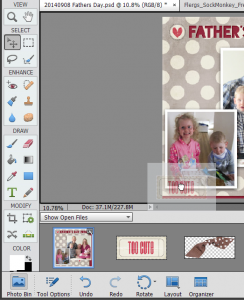 This is the feature Photoshop Elements users know and love - but today I'll share with you a few extra tips to unleash the power of the Photo Bin!
But first, what is the Photo Bin? The Photo Bin (also called the Project bin in PSE6-10) located at the bottom of the main Photoshop Elements window.
The Photo Bin will show all your open files, or a selected album from the Organizer.
With the Photo bin you can:
- Drag and drop images from the photo bin onto a layout
- Select multiple files to print
- Drag and drop images from an Organizer album onto a layout
- Save your half-finished layout (and all the supplies) as an album for later
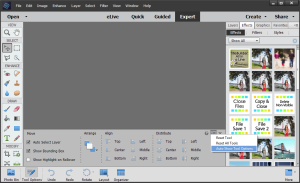 If you have a recent version of PSE and the tool options keep covering the photo bin, you can turn that off by clicking the Auto Show Tool Options in the menu to the top right in the tool options panel. At any time you can click the Photo bin button to show it again.
I have both PSE and PS installed on my computer, and the easy access to albums and open files is the number one reason I keep turning to PSE every time I want to scrapbook!
Quick Edit Mode
I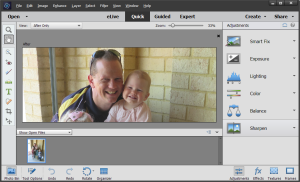 f you've ever been confused about what adjustment layers to add to which photos (or if you don't even know what adjustment layers are) you will love the Quick Edit mode in Photoshop Elements.
The Adjustments panel in Quick Edit mode takes the most common photo fixes, like exposure, lighting (levels) and color adjustments and puts them right at your fingertips. Just work from top to bottom using the preview images and sliders to get your photo looking good.
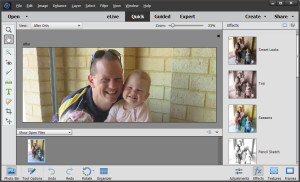 Plus, there are over 50 custom looks you can add to your photos in 10 different categories in the Effects Panel - think of them as Instagram filters, Lightroom presets or Radlab looks. Photoshop Elements does all the hard work and you just click on the look you want, drag a sliders and off you go!
There's also 10 textures and 10 frames to choose from in the remaining tabs.
If you are new to the quick edit mode, I show you how to use it in my class, Fast Photo Fixes.
Guided Edit Mode
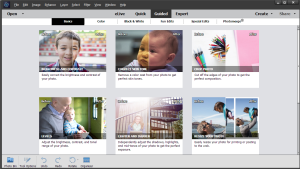 The Guided Edit mode walks you through more advanced photo editing scenarios with a combination of instructional text and tools.
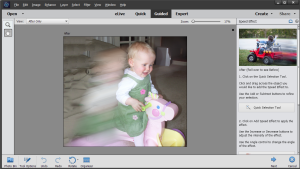
There are 40 guided edits ranging from Photomerge Group Shot (where you can merge multiple photos to make sure *everyone* is looking at the camera!) to fun edits like the new Speed Effect.
That said, Photoshop CC users do have access to one Photomerge, the panorama (head to File > Photomerge... to try it in PSCC).
One of my favorite guided edits is the Restore an Old Photo.
If you have Photoshop Elements, you really should take the time to try out out guided edits. You'll find that there's a lot creative and useful edits there.
Create & Share
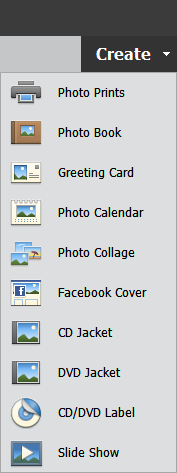
At the top right of the Editor window, there's two features that are often overlooked. The Create menu helps you, well, create custom projects. The share menu allows you to quickly and simply share your work online.
 Create
The Create menu contains a treasure trove of options, everything from printing multiple photos, to calendars to a Facebook cover.
One of the little known features of Photoshop Elements is the ability to create a whole album within a PSE (Photoshop Elements Project) file. 31 styles of Photo Books are available, and you can also delete the existing designs or create your own using the Advanced mode. You can export your photobooks at 220 dpi as a JPEG, TIFF or PDF. Depending on where you are in the world it also interfaces with photo book printers, such as Shutterfly. This is a great stepping stone for the newer users who want more flexibility than an online photobook creator and aren't ready for the complications of handling lots of individual files.
Why not take a look at the create menu today!
Share
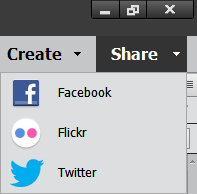 The share button makes it simple to share your photos online with Facebook, Flickr and Twitter. Just a little something to make your day easier.
Organizer
L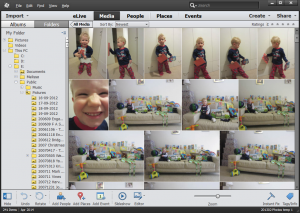 ong before Lightroom was even a twinkle in Adobe's eye, PSE users had the powerful, automated features in Organizer to make managing photos quick and easy.
The Organizer has come a long way since 2003, and with each version it becomes easier (and faster!) to work with a large library of photos or digital supplies.
Your people are recognized, everything is popped neatly onto a map and your events are easy to find and label. All you need to do is select your photos scrapbook!
I could write pages about my love for the Organizer. Oh wait, I already have!
So Photoshop Elements lovers, what features keep you coming back?

I am an Amazon affiliate so may receive a commission if you make a purchase.
This post contains affiliate links. This means that if you click through that link and purchase an item, I may receive a commission for referring the sale.
I only recommend classes and products that I know and trust. Thank you for using my link if you decide to purchase.
Melissa Shanhun is a participant in the Amazon Services LLC Associates Program, an affiliate advertising program designed to provide a means for me to earn fees by linking to Amazon.com and affiliated sites. As an Amazon Associate I earn from qualifying purchases.


Leave a Reply