
Digital Scrapbooking HQ

Learn to Scrapbook Using Your Computer

  • Blog
  • Classes
  • Book Melissa
  • About
  • Contact

Introducing Adobe Photoshop Elements 2019

October 4, 2018 By Melissa Shanhun 5 Comments

A little girl wearing sunglasses and smiling, with Editing and Adobe

Automation makes photo and video editing easy. Your creativity makes it amazing.  The Adobe Elements team has announced the release of Photoshop Elements 2019.

Ready to see it in action? Here's my video review:

Each year the team at Adobe work hard to bring us a great new edition of Photoshop Elements. The 2019 release focuses on:

  • streamlining the app’s usability to get you up and running quickly;
  • discoverability enhancements so that you can get inspired, learn and uncover fun new projects to try out yourself;
  • and improved performance across the board.
  • Plus, Elements 2019 features Auto Creations – powered by Adobe Sensei AI technology.
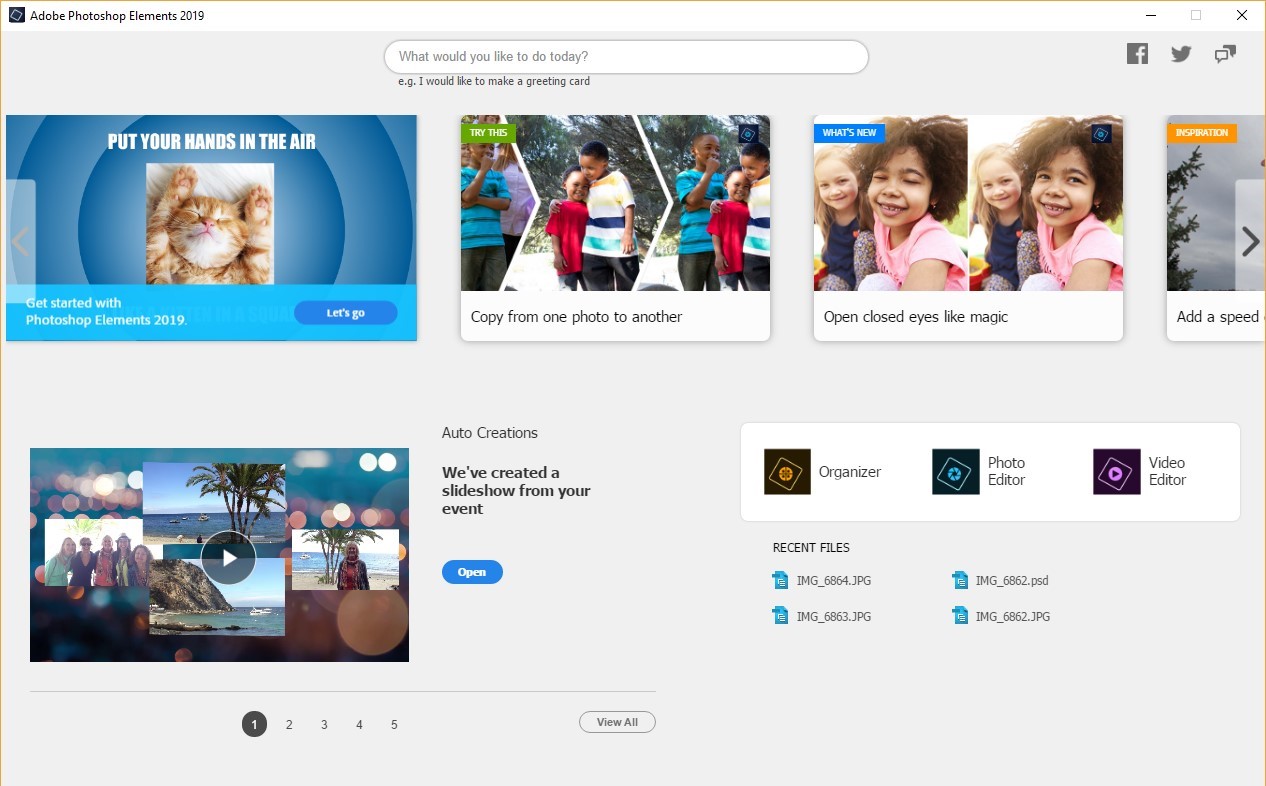
Photoshop Elements 2019 Home Screen

A Home Screen Designed for You

The first thing you’ll notice when opening Photoshop Elements 2019 is the brand-new Elements Home Screen that welcomes you every time you open the app. The new Home Screen offers a personalized experience by featuring info on what’s new since your last version of Elements and content suited to your level of expertise.

Photo of children sitting at a table with a birthday cake

Auto Creations, Made Just for You

Beautiful photo slideshows and collages are automatically created just for you highlighting memorable moments like birthdays and vacations and delivered upon launch in the Home Screen. It’s all thanks to photo automation powered by Adobe Sensei AI technology. It's scrapbooking inspiration delivered directly to you every time you open PSE2019!

Beyond the Home Screen, there are a number of exciting new features and enhancements across Photoshop Elements 2019 to help you create stunning photo creations so that you can quickly share your memories in print, the web and across your social media channels.

So, let’s dig in to what’s new and enhanced.

Photoshop Elements 2019 Photo Collage

Redesigned Photo Collages

In this release Adobe has redesigned your photo collage creation experience. This allows you to create collages with fewer clicks and quickly choose from stylish new templates that look great as Instagram posts and more. You also have the ability to customize your photo collages by adding frames and changing up backgrounds for the perfect finishing touch.

What a great way to create a quick digital scrapbooking page! You could start with a photo collage and then personalize it with your favorite digi scrap supplies!

Guided Edits

Photoshop Elements 2019 is introducing four all-new Guided Edits, bringing the total to 53 step-by-step photo editing guides to help you quickly edit and create.

Photoshop Elements 2019 Multi Photo Text Guided Edit
  • Create amazing multi-photo text: Now you can design visual text that features a different photo inside each letter to make words or names that look great as wall art, invitation cards or scrapbook pages. Gorgeous!

Photoshop Elements 2019 Meme Maker Guided Edit
  • Make fun memes: This Guided Edit walks you through the process of typing in text, adding filters, borders and more to turn your photos into memes that are perfect for sharing on social media. Be your own meme machine! 🙂

A bridge over a body of water with a mountain in the background
  • Turn part of your photo into a sketch: Make a unique artistic statement by turning part of a favorite photo into a sketch by brushing on the medium of your choice, including colored pencil, old paper, or an aged photo look. This feature would be amazing to use on supporting photos on your scrapbook page. Or use it to create background paper! The possibilities are endless.

Photo of a family with border
  • Add polish with text and border overlays: This new Guided Edit teaches you how to embellish photos with borders and text that make them stand out – whether you plan to print it out or post it online to social media...or digiscrap them!

Enjoy Better Performance

The team worked hard to improve your experience with Photoshop Elements, and you’ll notice it right off the bat with a faster download and installation process and improved performance throughout common photo editing tasks.

You can purchase Photoshop Elements 2019 on Amazon now!

Happy Scrapping!

Melissa
See my favourite things in the Digi Scrap HQ Store at Amazon.

I am an Amazon affiliate so may receive a commission if you make a purchase.

This post contains affiliate links. This means that if you click through that link and purchase an item, I may receive a commission for referring the sale.

I only recommend classes and products that I know and trust. Thank you for using my link if you decide to purchase.

Melissa Shanhun is a participant in the Amazon Services LLC Associates Program, an affiliate advertising program designed to provide a means for me to earn fees by linking to Amazon.com and affiliated sites. As an Amazon Associate I earn from qualifying purchases.

Filed Under: Digital Scrapbooking Tagged With: affiliate, Photoshop Elements, Photoshop Elements 2019, PSE19

About Melissa Shanhun

Melissa Shanhun is a Aussie mum of four and avid digital scrapbooker. She loves to show others how fun and easy it can be to record your precious memories with tech tools like Photoshop Elements.

Comments

  1. Carmelo Sansone says

    January 18, 2020 at 1:34 am

    i have a laserjet pro from hp m454dw im trying to do a copy on laber printing paper but im getting the pic like this is there any setting i need to change thank you https://uploads.disquscdn.com/images/f832f0b2191db23492151619b933fdcf022f823be0f1128a28246622faa825fa.jpg is there any setting to get it right ty

    Reply
    • Melissa Shanhun says

      January 20, 2020 at 11:56 pm

      It’s perhaps to do with the rollers.Does it print ok on normal paper? If so, you need to make sure you have the paper thickness set in the printer properties.

      I’d suggest checking the manual for instructions http://h10032.www1.hp.com/ctg/Manual/c06322617

      Reply
      • Carmelo Sansone says

        January 21, 2020 at 3:03 am

        yes on normal paper

        Reply
        • Melissa Shanhun says

          January 21, 2020 at 5:44 am

          It’s say it’s to do with the paper being thicker. You need the printer to be set up to take label paper.

          Reply
          • Melissa Shanhun says

            January 21, 2020 at 5:45 am

            Or did you mean lazer paper?

            Either way check the manual and get it touch with HP support – they should be able to help. It’s nothing to do with Photoshop Elements.

Leave a Reply Cancel reply

Your email address will not be published. Required fields are marked *

G’day! I’m Melissa


G’day, I’m Melissa, Aussie mum and digital scrapbook educator. I'm here to help you pair your photos with memories (and fun supplies!) and create your own photo books.
Click Here to Get Started

Search

Youtube

Join us on Facebook

On the Site

ABCs of PSE Adobe Photoshop Adobe Photoshop Elements affiliate Ali Edwards Becky Higgins Christmas Christmas Album Christmas layout ideas Christmas scrapbook Crafts December Daily December Daily Inspiration December Down Under Digital Scrapbook digital scrapbooking digital scrapbook pages Forever giveaway Holiday Faves interview keyboard shortcuts Lain Ehmann Nettio Designs photobook photobooks photo books photo editing Photoshop Photoshop Elements Photoshop Elements Organizer Podcast project life Project Life app PSE13 PSE2021 Scrapbook Scrapbooking Shutterfly templates tools Tutorial tutorials Week in the Life Workshop

Copyright © 2026 Melissa Shanhun 2011-2023

I wish to acknowledge the traditional custodians of the land I live and work on, the Whadjuk (Perth region) people. I acknowledge and respect the continuing Noongar culture and the contribution they make to the life of this city and this region.

Privacy policy

As an Amazon Associate I may earn from qualifying purchases.

We use cookies on our website to give you the most relevant experience by remembering your preferences and repeat visits. By clicking “Accept”, you consent to the use of ALL the cookies.
Do not sell my personal information.
Cookie SettingsAccept
Manage consent

Privacy Overview

This website uses cookies to improve your experience while you navigate through the website. Out of these, the cookies that are categorized as necessary are stored on your browser as they are essential for the working of basic functionalities of the website. We also use third-party cookies that help us analyze and understand how you use this website. These cookies will be stored in your browser only with your consent. You also have the option to opt-out of these cookies. But opting out of some of these cookies may affect your browsing experience.
Necessary
Always Enabled
Necessary cookies are absolutely essential for the website to function properly. These cookies ensure basic functionalities and security features of the website, anonymously.
CookieDurationDescription
cookielawinfo-checkbox-analytics11 monthsThis cookie is set by GDPR Cookie Consent plugin. The cookie is used to store the user consent for the cookies in the category "Analytics".
cookielawinfo-checkbox-functional11 monthsThe cookie is set by GDPR cookie consent to record the user consent for the cookies in the category "Functional".
cookielawinfo-checkbox-necessary11 monthsThis cookie is set by GDPR Cookie Consent plugin. The cookies is used to store the user consent for the cookies in the category "Necessary".
cookielawinfo-checkbox-others11 monthsThis cookie is set by GDPR Cookie Consent plugin. The cookie is used to store the user consent for the cookies in the category "Other.
cookielawinfo-checkbox-performance11 monthsThis cookie is set by GDPR Cookie Consent plugin. The cookie is used to store the user consent for the cookies in the category "Performance".
viewed_cookie_policy11 monthsThe cookie is set by the GDPR Cookie Consent plugin and is used to store whether or not user has consented to the use of cookies. It does not store any personal data.
Functional
Functional cookies help to perform certain functionalities like sharing the content of the website on social media platforms, collect feedbacks, and other third-party features.
Performance
Performance cookies are used to understand and analyze the key performance indexes of the website which helps in delivering a better user experience for the visitors.
Analytics
Analytical cookies are used to understand how visitors interact with the website. These cookies help provide information on metrics the number of visitors, bounce rate, traffic source, etc.
Advertisement
Advertisement cookies are used to provide visitors with relevant ads and marketing campaigns. These cookies track visitors across websites and collect information to provide customized ads.
Others
Other uncategorized cookies are those that are being analyzed and have not been classified into a category as yet.
SAVE & ACCEPT