Digital Scrapbooking HQ

Learn to Scrapbook Using Your Computer

  • Blog
  • Classes
  • Book Melissa
  • About
  • Contact

Inside my Album: Automagic Scrapping with Project Life

June 14, 2013 By Melissa Shanhun 4 Comments

Last week I shared how I'm combining digital and paper layouts in my album (with a splash of Project Life Olive Edition)

You already know I'm a big fan of using time-saving shortcuts in my scrapbooks, so it won't surprise you that I created the pages I'm sharing today with a cool tool that does the scrapping for you.

It's not quickpages, or templates, but something different altogether. An almost magical tool that starts with a blank canvas and pulls in the photos and journal cards that you want to use in up to 7 different pocket page layouts...

What could this be?

Here's the scoop direct from the designer, Wendyzine:

WZ_SIPocketPages_600-01-1Want a faster way to scrap? An easier way to catch up on all those piles of photos? Want to escape from the guilt of unscrapped photos? Or, maybe you just have project that you'd like to work on digitally! These actions help you scrap pocket-style pages using any photos, papers or journal cards in your stash. And, even better, they also work with Becky Higgins' Project Life digi supplies.

How does it work? Really it's quite simple! Choose the layout you want to scrap from the 7 layout options provided. Prepare some photos, papers and journal cards (at least know where to find them on your computer). Then, run the action. It will lead you through the steps of placing your items on the page, cropping them and arranging them. When you're done, add journaling and save a JPG for print and web.

It's a super flexible system. You can choose the "regular" version or the "alternate" version of the actions. (The alternate versions use papers or photos instead of PNG journal cards.) And, choose between the All-in-One actions to scrap the entire page, or just the individual pocket actions to scrap a page over time.

So, if you've been held back from creating Pocket Pages because you really wanted it to be digi, now's the time to try it!


So, I tried it.

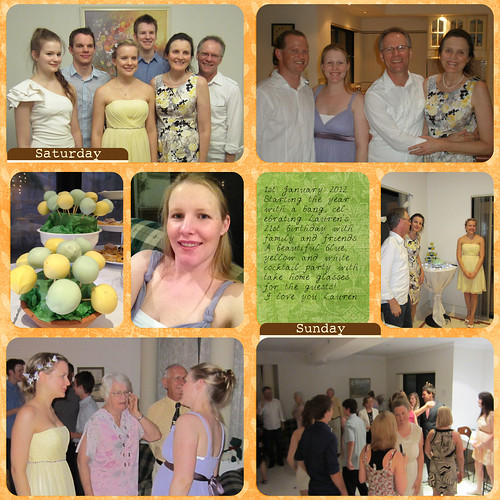
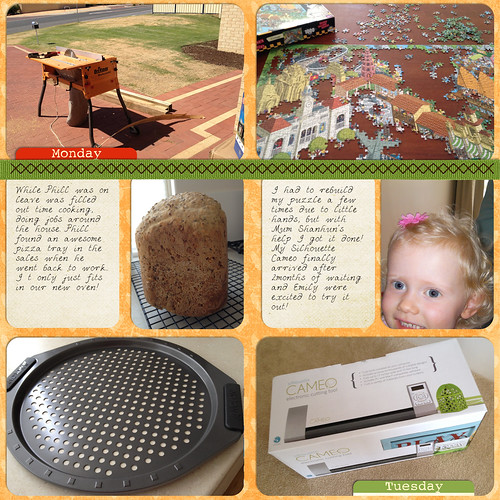
Here's the Project Life style pages I created using Wendyzine's Scrap it Actions.
201201 Week 1_3600

Journalling

1st January 2012

Starting the year with a bang, celebrating Lauren’s 21st birthday with family and friends.
A beautiful blue, yellow and white cocktail party with take home glasses for the guests!
I love you Lauren
20120102-03

Journalling

While Phill was on leave was filled out time cooking, doing jobs around the house. Phill found an awesome pizza tray in the sales when he went back to work.. It only just fits in our new oven!

I had to rebuild my puzzle a few times due to little hands, but with Mum Shanhun’s help I got it done!
My Silhouette Cameo finally arrived after 2months of waiting and Emily were excited to try it out!

Credits

Wendyzine's Pocket Page Actions
Everyday Life kit at the Daily Digi from the Digi Game

Want to try it out free?

So what do you think? Would you like to see how it feels to have Photoshop Elements do the work for you?

Wendy's shared a free sample scrap it action for you - you can download it at Scrapbookgraphics here

Not sure how to install an action? No problem - here's how:


Care to Share?

I'd love to see what you've created lately, so go ahead and link up to any layout you've created in the comments.

I can't wait to see

Melissa1

PS Head to our Digital Scrapbooking HQ Flickr Group for more inspiration.

See my favourite things in the Digi Scrap HQ Store at Amazon.

I am an Amazon affiliate so may receive a commission if you make a purchase.

Filed Under: Inside My Album Tagged With: project life, scrap it actions, Wendyzine

About Melissa Shanhun

Melissa Shanhun is a Aussie mum of four and avid digital scrapbooker. She loves to show others how fun and easy it can be to record your precious memories with tech tools like Photoshop Elements.

Comments

  1. geezee says

    June 15, 2013 at 12:55 am

    I am excited to try this action when I get Photoshop loaded on my new computer. Now where did I leave that disc with the license?

    Reply
  2. Gela says

    June 16, 2013 at 3:24 pm

    Thanks for the great tutorial. I have been on the fence about upgrading to Photoshop 11. I bought your Organizing supplies last year and thought It would be very different in Photoshop 11 (I have Photoshop Elements10). THANKS!

    Reply
    • Melissa Shanhun says

      June 16, 2013 at 4:02 pm

      Thanks Gela. It’s a bit of a change – but I think it is well worth it. I’m glad you enjoyed the tutorial

      Reply
  3. Cheryl Sayre McCain says

    June 16, 2013 at 8:01 pm

    I hadn’t seen this action by Wendy but it’s awesome! I created a similar layout just yesterday using a number of my floral images in order to get multiples on just one page.
    You can read more about it here if you wish.
    http://cherylmccainphotography.com/snappy-weekend-scrapbooking/

    Thanks for sharing Melissa, great post and great scrapping time-saver as well as space in our albums.

    Reply

Leave a Reply Cancel reply

Your email address will not be published. Required fields are marked *

G’day! I’m Melissa


G’day, I’m Melissa, Aussie mum and digital scrapbook educator. I'm here to help you pair your photos with memories (and fun supplies!) and create your own photo books.
Click Here to Get Started

Search

Youtube

Join us on Facebook

On the Site

ABCs of PSE Adobe Photoshop Adobe Photoshop Elements affiliate Ali Edwards Becky Higgins Christmas Christmas Album Christmas layout ideas Christmas scrapbook Crafts December Daily December Daily Inspiration December Down Under Digital Scrapbook digital scrapbooking digital scrapbook pages Forever giveaway Holiday Faves interview keyboard shortcuts Lain Ehmann Nettio Designs photobook photobooks photo books photo editing Photoshop Photoshop Elements Photoshop Elements Organizer Podcast project life Project Life app PSE13 PSE2021 Scrapbook Scrapbooking Shutterfly templates tools Tutorial tutorials Week in the Life Workshop

Copyright © 2026 Melissa Shanhun 2011-2023

I wish to acknowledge the traditional custodians of the land I live and work on, the Whadjuk (Perth region) people. I acknowledge and respect the continuing Noongar culture and the contribution they make to the life of this city and this region.

Privacy policy

As an Amazon Associate I may earn from qualifying purchases.

We use cookies on our website to give you the most relevant experience by remembering your preferences and repeat visits. By clicking “Accept”, you consent to the use of ALL the cookies.
Do not sell my personal information.
Cookie SettingsAccept
Manage consent

Privacy Overview

This website uses cookies to improve your experience while you navigate through the website. Out of these, the cookies that are categorized as necessary are stored on your browser as they are essential for the working of basic functionalities of the website. We also use third-party cookies that help us analyze and understand how you use this website. These cookies will be stored in your browser only with your consent. You also have the option to opt-out of these cookies. But opting out of some of these cookies may affect your browsing experience.
Necessary
Always Enabled
Necessary cookies are absolutely essential for the website to function properly. These cookies ensure basic functionalities and security features of the website, anonymously.
CookieDurationDescription
cookielawinfo-checkbox-analytics11 monthsThis cookie is set by GDPR Cookie Consent plugin. The cookie is used to store the user consent for the cookies in the category "Analytics".
cookielawinfo-checkbox-functional11 monthsThe cookie is set by GDPR cookie consent to record the user consent for the cookies in the category "Functional".
cookielawinfo-checkbox-necessary11 monthsThis cookie is set by GDPR Cookie Consent plugin. The cookies is used to store the user consent for the cookies in the category "Necessary".
cookielawinfo-checkbox-others11 monthsThis cookie is set by GDPR Cookie Consent plugin. The cookie is used to store the user consent for the cookies in the category "Other.
cookielawinfo-checkbox-performance11 monthsThis cookie is set by GDPR Cookie Consent plugin. The cookie is used to store the user consent for the cookies in the category "Performance".
viewed_cookie_policy11 monthsThe cookie is set by the GDPR Cookie Consent plugin and is used to store whether or not user has consented to the use of cookies. It does not store any personal data.
Functional
Functional cookies help to perform certain functionalities like sharing the content of the website on social media platforms, collect feedbacks, and other third-party features.
Performance
Performance cookies are used to understand and analyze the key performance indexes of the website which helps in delivering a better user experience for the visitors.
Analytics
Analytical cookies are used to understand how visitors interact with the website. These cookies help provide information on metrics the number of visitors, bounce rate, traffic source, etc.
Advertisement
Advertisement cookies are used to provide visitors with relevant ads and marketing campaigns. These cookies track visitors across websites and collect information to provide customized ads.
Others
Other uncategorized cookies are those that are being analyzed and have not been classified into a category as yet.
SAVE & ACCEPT