Digital Scrapbooking HQ

Learn to Scrapbook Using Your Computer

  • Blog
  • Classes
  • Book Melissa
  • About
  • Contact

Digital Scrapbooking Primer: Organising Templates

February 28, 2012 By Melissa Shanhun 9 Comments

Adobe Photoshop Elements Organzier


The Photoshop Elements Organizer comes with all recent versions of Photoshop Elements for Windows and version 9 onwards for the Mac.

You can use Photoshop Elements Organizer to organise your photos (indeed this is what it was designed for!) but today I'm going to demonstrate how I use it organize my templates.

I've created a video tutorial showing you how I tag all my templates:

Use Search by Details (Metadata) to Find Your templates
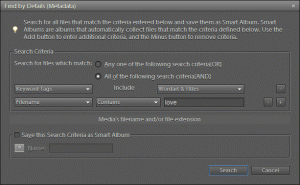
Find by Details Photoshop Elements

Templates?

Find Templates by searching for:

  • File name ends with tiff
  • File name ends with psd
  • Tag by number of photo spots or style (graphic or clustered)

Want to learn more about Organizing Supplies?
Check out my workshop all about Organising Digital Scrapbooking Supplies.

See my favourite things in the Digi Scrap HQ Store at Amazon.

I am an Amazon affiliate so may receive a commission if you make a purchase.

Filed Under: Digital Scrapbooking Primer, Tutorials Tagged With: Adobe Photoshop, Adobe Photoshop Elements, album templates, Digital Scrapbook, digital scrapbooking templates, Metadata, Scrapbook, Tag (metadata), templates

About Melissa Shanhun

Melissa Shanhun is a Aussie mum of four and avid digital scrapbooker. She loves to show others how fun and easy it can be to record your precious memories with tech tools like Photoshop Elements.

Comments

  1. Angela says

    February 29, 2012 at 2:50 am

    Hi Melissa
    I attended your free seminar this week. Organizing digital supplies has been my biggest obsticle in digital scrapbooking. I am VERY new to digi. It is not something that comes naturally to me. I have made a few pages using templates. I would like to buy more products but I don’t want to end up with a bunch of supplies that I cannot find. I watched Kayla Lamouroux “Lightroom” system of organizing products and have heard a lot of rave reviews. HOWEVER, I found the instructions soooo confusing. Again digi does not come naturally to me. Using PSE system seems a whole lot easier. You mentioned you are a “digi file” member so I imagine you listing to the Digi Show”. On the February 16th (about 40 minutes into the show) they mentioned that tagging sometimes is not really tagged in the metadata and if you have a system crash you will lose all your work. The host did mention that was not familiar with PSE 9 organizing system. What is your opinion and if you include steps to keep your tagging intact if you have a system crash.

    Reply
    • Melissa Shanhun says

      February 29, 2012 at 4:11 pm

      Hi Angela – I’m working on an article for this one!

      But in the mean time PSE has a backup system, and I’ve change PCs and upgraded 3 times without losing anything… I’ll be in touch when the article goes lives!

      Reply
      • Melissa Shanhun says

        August 14, 2013 at 12:06 pm

        For anyone looking for more information on backup up in case of a system crash… http://thedailydigi.com/effortless-organizing-in-photoshop-elements/

        Reply
    • Melissa Shanhun says

      April 16, 2012 at 8:45 pm

      The main step I take is actually backing up my Photoshop Elements catalogue. I do that using the File – Backup menu and also by ensuring the PSE catalogue file is backed up by Mozy online too 🙂

      PNGs can’t contain metadata, so no matter what system you use, unless you covert all your files like Kayla does, you need to also back up the organisation system as well as your supplies

      Reply
  2. Julia says

    March 24, 2012 at 4:54 pm

    Hi Aimee I am sort of a newvie, I have been downloading for months and I am very over whelmed and I havent down one page..I was wondering if you have the same tutorials in PDF or written, my internet is slow and limited and I cant use the videos..Also I find if I have it printed as I am doing a project I can follow it alot better..
    thanks for the great tutorials and beautiful artwork!!
    Julia

    Reply
    • Melissa Shanhun says

      April 16, 2012 at 8:40 pm

      Hi Julia I don’t have written tutorials right now, but that’s something I may look into in the future. What’s the biggest issue you are having right now? May you could make a couple of pages before worrying about organising? Just to help you get started?

      Reply
      • Julia says

        May 7, 2012 at 6:57 pm

        Hi Meliss I just need the basic on starting a page..I open my PSE 10 and I really dont know what to do..I see so many “you need tos” and Im confused..opening, saving as I go etc..

        Reply
        • Melissa Shanhun says

          October 30, 2012 at 8:33 pm

          Hi Julia – I just wanted you know, I do have a PDF – Introducing Digital Scrapbooking that will be on sale soon! Email melissa at mshanhun.com if this is something you’d like to get a hold of 🙂

          Reply
  3. Melissa Shanhun says

    May 7, 2012 at 8:07 pm

    Hi Julia
    I’m emailing you now… Why not check out this page for the basics
    http://www.digitalscrapbookinghq.com/digital-scrapbooking-primer-the-only-4-tools-you-need/

    I hope it helps!

    Reply

Leave a Reply Cancel reply

Your email address will not be published. Required fields are marked *

G’day! I’m Melissa


G’day, I’m Melissa, Aussie mum and digital scrapbook educator. I'm here to help you pair your photos with memories (and fun supplies!) and create your own photo books.
Click Here to Get Started

Search

Youtube

Join us on Facebook

On the Site

ABCs of PSE Adobe Photoshop Adobe Photoshop Elements affiliate Ali Edwards Becky Higgins Christmas Christmas Album Christmas layout ideas Christmas scrapbook Crafts December Daily December Daily Inspiration December Down Under Digital Scrapbook digital scrapbooking digital scrapbook pages Forever giveaway Holiday Faves interview keyboard shortcuts Lain Ehmann Nettio Designs photobook photobooks photo books photo editing Photoshop Photoshop Elements Photoshop Elements Organizer Podcast project life Project Life app PSE13 PSE2021 Scrapbook Scrapbooking Shutterfly templates tools Tutorial tutorials Week in the Life Workshop

Copyright © 2026 Melissa Shanhun 2011-2023

I wish to acknowledge the traditional custodians of the land I live and work on, the Whadjuk (Perth region) people. I acknowledge and respect the continuing Noongar culture and the contribution they make to the life of this city and this region.

Privacy policy

As an Amazon Associate I may earn from qualifying purchases.

We use cookies on our website to give you the most relevant experience by remembering your preferences and repeat visits. By clicking “Accept”, you consent to the use of ALL the cookies.
Do not sell my personal information.
Cookie SettingsAccept
Manage consent

Privacy Overview

This website uses cookies to improve your experience while you navigate through the website. Out of these, the cookies that are categorized as necessary are stored on your browser as they are essential for the working of basic functionalities of the website. We also use third-party cookies that help us analyze and understand how you use this website. These cookies will be stored in your browser only with your consent. You also have the option to opt-out of these cookies. But opting out of some of these cookies may affect your browsing experience.
Necessary
Always Enabled
Necessary cookies are absolutely essential for the website to function properly. These cookies ensure basic functionalities and security features of the website, anonymously.
CookieDurationDescription
cookielawinfo-checkbox-analytics11 monthsThis cookie is set by GDPR Cookie Consent plugin. The cookie is used to store the user consent for the cookies in the category "Analytics".
cookielawinfo-checkbox-functional11 monthsThe cookie is set by GDPR cookie consent to record the user consent for the cookies in the category "Functional".
cookielawinfo-checkbox-necessary11 monthsThis cookie is set by GDPR Cookie Consent plugin. The cookies is used to store the user consent for the cookies in the category "Necessary".
cookielawinfo-checkbox-others11 monthsThis cookie is set by GDPR Cookie Consent plugin. The cookie is used to store the user consent for the cookies in the category "Other.
cookielawinfo-checkbox-performance11 monthsThis cookie is set by GDPR Cookie Consent plugin. The cookie is used to store the user consent for the cookies in the category "Performance".
viewed_cookie_policy11 monthsThe cookie is set by the GDPR Cookie Consent plugin and is used to store whether or not user has consented to the use of cookies. It does not store any personal data.
Functional
Functional cookies help to perform certain functionalities like sharing the content of the website on social media platforms, collect feedbacks, and other third-party features.
Performance
Performance cookies are used to understand and analyze the key performance indexes of the website which helps in delivering a better user experience for the visitors.
Analytics
Analytical cookies are used to understand how visitors interact with the website. These cookies help provide information on metrics the number of visitors, bounce rate, traffic source, etc.
Advertisement
Advertisement cookies are used to provide visitors with relevant ads and marketing campaigns. These cookies track visitors across websites and collect information to provide customized ads.
Others
Other uncategorized cookies are those that are being analyzed and have not been classified into a category as yet.
SAVE & ACCEPT