
Do you have a photo that you love, but it just needs a little help to look its best? With my class Fast Photo Fixes you can give your photos more sparkle! [Continue reading]
How to Import and Edit Photos on your Computer
Experts say the average person takes 150 photos a year. Really? I think that’s an understatement. Each day we are adding to the collections on our phones, cameras and tablets. It can get a little overwhelming… BUT there’s a way to keep all your photos safe and secure and easy to browse. Photoshop Elements! Photoshop Elements is… [Continue reading]
Aviary makes your phone photos shine

Would you like to make the most of your down time and get some photos ready to scrap? I know I would! Today, I’ve invited my friend, and fellow Ultimate DIY Bundle author Beth Soler from Scrapping Wonders to show you her favorite app for editing photos on her phone. Beth has been scrapping and crafting for… [Continue reading]
Create your own Photo Collage in Picasa

Create a quick photo collage with Picasa [Continue reading]
Learn how to edit your photos in Photoshop Elements
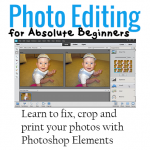
Tired of battling with Photoshop Elements? Photo Editing for Absolute Beginners answers the most common questions that new Photoshop Elements users ask me. Straight to the point, using the simplest method that will get you in and out of Photoshop Elements in a couple of minutes. You’ll learn how to: Find your way around the Photoshop Elements… [Continue reading]
Learn easy fixes to common photo problems using Photoshop Elements

Did you know you can use Photoshop Elements to clarify and and brighten your photos in just a few seconds? Using the levels adjustment in the Guided Edit mode you can fix your dull photos and bring true life colours to your photos. No need for actions, filters apps or gadgets! Levels adjustments can help… [Continue reading]