Get your photos onto your pages with bite-sized videos and step-by-step instructions
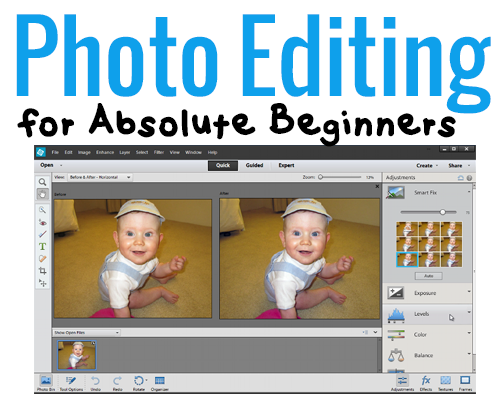
Have you got a copy of Photoshop Elements on your computer that is gathering dust?
Have you tried following tutorials only to find they assume you know which panel is which, and what all the names and icons mean?
Do you just want to print a photo, but no one will give you a straight answer on how to do it?
I hear you!
Photo Editing for Absolute Beginners answers the most common questions that new Photoshop Elements users ask me. Straight to the point, using the simplest method that will get you in and out of Photoshop Elements in a couple of minutes.
You'll learn how to:
- Find your way around the Photoshop Elements workspace - so you can find the tools and commands you need
- Open a photo in Photoshop Elements - and save it so that you can't ruin your original
- Edit a photo in quick mode - and improve the look of your photos
- Crop a photo for printing - so you get the whole subject in the frame
- Add text to a photo - tell your story or make a postcard
- Save a photo for printing online - so the prints look the best they can
- Print at home - on photo paper of ANY size
- Print multiple photos on a 4x6 - a cost effective way to get your smaller prints for pocket scrapping
You’ll gain the confidence to work on your own - even if you are brand new to Photoshop Elements
Photo Editing for Absolute Beginners
Usually, my Photoshop Elements video classes retail for $30.
But since I want you to be able to start today, I want to make sure this class is something anyone can afford.
This class is a steal at just $12!
Click the add to cart button to buy now
If you have already got a Digital Scrapbooking HQ login please LOG IN NOW
What you’ll receive for just $12:
- 7 videos that show you the very basics of photo editing Photoshop Elements - straight and to the point!
- Full-color PDF handouts that walk you step-by-step through each tutorial - keep them handy for future reference.
- Interactive comments below each video and email access to me so that you can get specific help if you need it - sometimes you need extra help!
Why Learn with Melissa?
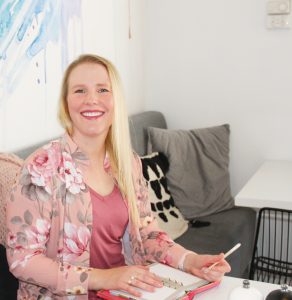
G’day, I’m Melissa, Aussie mum, digital scrapbooker, professional organizer and teacher. I love pairing photos with memories of meaningful moments in my everyday life.
Here in Perth, I spend my everyday life with my husband, Phill, and our four children: Emily, Edward, Lucy and Matthew. Digital scrapbooking helps me tell the stories in our life. I love the versatility of digi scrapping. I can go simple, using phone photos and a line of journaling. Or, I can spend time in Photoshop Elements embellishing layouts with digital paint, flowers and bling.
I would love to introduce you to the joy of scrapbooking with your computer. I've been teaching and working with Adobe Photoshop Elements for many years, and my former career in education gives me the unique blend of skills needed to teach the technical skills, without the stress and fuss.
If you want help from a real-life scrapbooker you're in the right place.
"I have just watched the first two videos of your "Absolute Beginners" class. All I can say is I wished I would have started with your class when I first started using PSE. I remember looking at your FREE videos waaay back when I started, but knowing what I know now, I wished I would have started here first. Yes, I've used PSE for years, but mainly as an editing tool for my photos. So here I am. I'm going to learn PSE for digital scrapbooking ONCE and for ALL. Thank you!" - Jeannette C, customer
FAQ
What's inside?
- 7 high definition videos that show you step by step how to start using Photoshop Elements (recorded in PSE12)
- Step-by-step handouts for future reference.
- Email access to me for any questions you may have.
Can I do the class at any time?
Yes 🙂 All the videos and handouts are online and available 24/7.
How long do I have access to the class?
You have ongoing access to the class, it's available as long as Digital Scrapbooking HQ is around! There's no time limit.
How do I see the videos?
When you purchase Photo Editing for Absolute Beginners you'll walk through a registration process to and your class will be on your welcome page. Problems? Email me melissa@mshanhun.com
Can I watch on my iPad?
The class videos will play on your iPad, tablet, Mac or PC
I don't have Photoshop Elements 12. Will this be useful to me?
Yes! If you have Photoshop Elements 11 or newer on Windows or Mac this class will suit you perfectly!
If you have an older edition of Photoshop Elements, the screen will look a little different, so if this will bother you check out my other classes recorded in older versions of Photoshop Elements.
Which payments do you accept?
You can pay via PayPal or use PayPal's secure credit card processing system if you prefer to pay via credit card.
What if I'm not sure it's for me?
30-day money back guarantee:

P.S.
I know you’ll be thrilled with the class I have prepared for you. Photo Editing for Absolute Beginners videos and handouts are available online 24/7. No physical products are shipped.
Start editing your photos today
Click the add to cart button to buy now
If you have already got a Digital Scrapbooking HQ login please LOG IN NOW