Digital Scrapbooking HQ

Learn to Scrapbook Using Your Computer

  • Blog
  • Classes
  • Book Melissa
  • About
  • Contact

Why your photos aren’t slowing down your computer

October 23, 2015 By Melissa Shanhun Leave a Comment

Have you ever sat staring at the spinning cursor or beachball or hourglass, waiting for your computer to just. open. the. file?

Have you ever thought, maybe all these 40 000 photos are slowing down my computer? Maybe I should move them off onto an external hard drive?

The term memory means two different things here:

  • Random Access Memory (RAM)
  • Hard Drive space

The speed of your computer is usually more affected by Random Access Memory (RAM) than how much free space there is on your Hard Drive.

If you simply move your photos or files onto an external hard drive (EHD) you will just exacerbate the issue. Your computer's hard drive is much faster than any EHD.

Thanks to Fraser Spiers here's a good analogy to explain what is happening. I've edited it somewhat, but thanks to Fraser for putting these concepts in simple terms.

The Desk

Think of RAM as your physical wooden desk. It has a certain fixed size and, if you want to work on paper documents, you have to have them on your desk. The number of documents and books you can work on at once is limited by the size of your desk. If you want to work on more paper items at once, get a bigger desk.

Similarly, if you want to work with more files and applications at the one time, you need more RAM.

To find our how much RAM you have, head to the Help - System Info menu in the PSE Organizer. If your RAM is on the low end (8Gb or less), you will find that it may take a long time to load your Organizer catalog, or your computer may run slowly with lots of files open.

You can use the Crucial System Scanner to see if you can upgrade your RAM in your computer. Then you can order online or have your local computer store install it for you.

The Filing Cabinet

Think of your hard drive as your filing cabinet. It can hold many more paper documents than your desk, but you can't work on a document while it's hanging in a drawer. If you want to work on something, you have to move it from the filing cabinet to your desktop. That's the paper equivalent of loading an application or opening a file. If your desktop is already full, you need to put something back in the filing cabinet.

You keep a lot of things in your filing cabinet that you don't want to work on every day. Those older documents don't slow down your work at your desk unless you bring them out and put them on the desk. They can happily live in the filing cabinet forever ... until you fill the cabinet and then it's time to throw away the old stuff or get another cabinet. Similarly, the number of files on your hard drive does not seriously impact the performance of your computer, unless the drive is over 90% full. (You don't have any room, to put the files away when it's time to get out the new file, so you computer slowly puts away one sheet of paper each time if gets a new one out.)

If your computer is super slow as saving files (or makes "crunching" noises often) that's usually a sign you need more Hard Drive space.
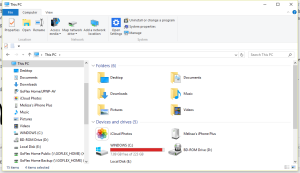
windows 10 this pcTo find our how much Hard Drive space you have, head to the Apple - System Information menu or the This Desktop icon in Windows Explorer.

You can use the Crucial System Scanner to see if you can upgrade your Hard Drive in your computer. Then you can order online or have your local computer store install it for you.

Having a lot of files will not affect the speed of your computer unless the drive is 90+% full. So I have 2 terabytes of files on my hard drive with no issues.

I hope this helps explain the concept and gives you some next steps to make your computer less frustrating to work with.

Still confused? Just leave me a comment and I'll see what I can do to help!

Melissa1

See my favourite things in the Digi Scrap HQ Store at Amazon.

I am an Amazon affiliate so may receive a commission if you make a purchase.

Filed Under: Digital Scrapbooking Tagged With: EHD, hard drive space, HDD, Memory, RAM

About Melissa Shanhun

Melissa Shanhun is a Aussie mum of four and avid digital scrapbooker. She loves to show others how fun and easy it can be to record your precious memories with tech tools like Photoshop Elements.

Leave a Reply Cancel reply

Your email address will not be published. Required fields are marked *

G’day! I’m Melissa


G’day, I’m Melissa, Aussie mum and digital scrapbook educator. I'm here to help you pair your photos with memories (and fun supplies!) and create your own photo books.
Click Here to Get Started

Search

Youtube

Join us on Facebook

On the Site

ABCs of PSE Adobe Photoshop Adobe Photoshop Elements affiliate Ali Edwards Becky Higgins Christmas Christmas Album Christmas layout ideas Christmas scrapbook Crafts December Daily December Daily Inspiration December Down Under Digital Scrapbook digital scrapbooking digital scrapbook pages Forever giveaway Holiday Faves interview keyboard shortcuts Lain Ehmann Nettio Designs photobook photobooks photo books photo editing Photoshop Photoshop Elements Photoshop Elements Organizer Podcast project life Project Life app PSE13 PSE2021 Scrapbook Scrapbooking Shutterfly templates tools Tutorial tutorials Week in the Life Workshop

Copyright © 2026 Melissa Shanhun 2011-2023

I wish to acknowledge the traditional custodians of the land I live and work on, the Whadjuk (Perth region) people. I acknowledge and respect the continuing Noongar culture and the contribution they make to the life of this city and this region.

Privacy policy

As an Amazon Associate I may earn from qualifying purchases.

We use cookies on our website to give you the most relevant experience by remembering your preferences and repeat visits. By clicking “Accept”, you consent to the use of ALL the cookies.
Do not sell my personal information.
Cookie SettingsAccept
Manage consent

Privacy Overview

This website uses cookies to improve your experience while you navigate through the website. Out of these, the cookies that are categorized as necessary are stored on your browser as they are essential for the working of basic functionalities of the website. We also use third-party cookies that help us analyze and understand how you use this website. These cookies will be stored in your browser only with your consent. You also have the option to opt-out of these cookies. But opting out of some of these cookies may affect your browsing experience.
Necessary
Always Enabled
Necessary cookies are absolutely essential for the website to function properly. These cookies ensure basic functionalities and security features of the website, anonymously.
CookieDurationDescription
cookielawinfo-checkbox-analytics11 monthsThis cookie is set by GDPR Cookie Consent plugin. The cookie is used to store the user consent for the cookies in the category "Analytics".
cookielawinfo-checkbox-functional11 monthsThe cookie is set by GDPR cookie consent to record the user consent for the cookies in the category "Functional".
cookielawinfo-checkbox-necessary11 monthsThis cookie is set by GDPR Cookie Consent plugin. The cookies is used to store the user consent for the cookies in the category "Necessary".
cookielawinfo-checkbox-others11 monthsThis cookie is set by GDPR Cookie Consent plugin. The cookie is used to store the user consent for the cookies in the category "Other.
cookielawinfo-checkbox-performance11 monthsThis cookie is set by GDPR Cookie Consent plugin. The cookie is used to store the user consent for the cookies in the category "Performance".
viewed_cookie_policy11 monthsThe cookie is set by the GDPR Cookie Consent plugin and is used to store whether or not user has consented to the use of cookies. It does not store any personal data.
Functional
Functional cookies help to perform certain functionalities like sharing the content of the website on social media platforms, collect feedbacks, and other third-party features.
Performance
Performance cookies are used to understand and analyze the key performance indexes of the website which helps in delivering a better user experience for the visitors.
Analytics
Analytical cookies are used to understand how visitors interact with the website. These cookies help provide information on metrics the number of visitors, bounce rate, traffic source, etc.
Advertisement
Advertisement cookies are used to provide visitors with relevant ads and marketing campaigns. These cookies track visitors across websites and collect information to provide customized ads.
Others
Other uncategorized cookies are those that are being analyzed and have not been classified into a category as yet.
SAVE & ACCEPT