Digital Scrapbooking HQ

Learn to Scrapbook Using Your Computer

  • Blog
  • Classes
  • Book Melissa
  • About
  • Contact

Scrapbooking Inspiration Podcast: Get Totally Rad Photos with Radlab

September 7, 2017 By Melissa Shanhun 3 Comments

http://media.blubrry.com/scrapobookingpodcast/traffic.libsyn.com/digitalscrapbooking/SIP65_RadLab_mixdown.mp3

Podcast: Play in new window | Download (5.3MB)

Subscribe: RSS
Scrapbooking Inspiration PodcastIn this episode of the Scrapbooking Inspiration Podcast, I'm sharing my favorite tool to take my photos and get them looking their best.
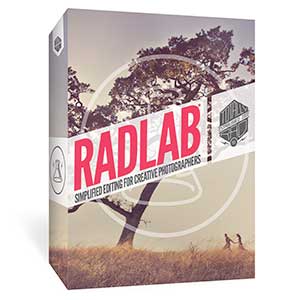
Radlab

RadLab is a plugin for Photoshop & Photoshop Elements that allows you to make creative edits to your photos using a simple visual editor. I love that I can just use a few clicks to get a consistent, professional look for your photos.

Did you know RadLab works perfectly with Photoshop Elements?
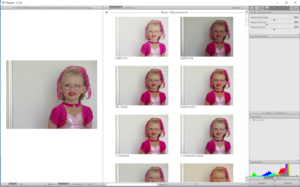
Fix photos with RadlabAll you need to do is:

  • Open your photo
  • Click the little RadLab button
  • Edit with the Stylets or Recipes
  • Click Finish
  • Save
  • Enjoy your Totally Rad Photo!

Get Totally RadLab here.

Download my RadLab Recipes

If you have Radlab you can use these to edit your own photos.
Sunlit Girl recipe

Joy Recipe

Enter to Win RadLabEnter to Win a Copy of Radlab

Check out our 6th birthday celebration giveaway here.

 

Melissa1

Enjoy the Podcast? Subscribe for Free

Subscribe to the Scrapbooking Inspiration Podcast on iTunes now
Preview episodes:
 
  • Happy Birthday! Scrapbooking Inspiration Podcast
  • Katie the Creative Lady: Scrapbooking Inspiration Podcast
  • March Madness – Scrapbooking Inspiration from Calvinball & the Great Stash Bash: Scrapbooking Inspiration Podcast
  • Get Organized Supplies the Simple Way: Scrapbooking Inspriation Podcast
  • Scrapbooking Inspiration Podcast: Welcome to 2018
  • Scrapbooking Inspiration Podcast: Scrap Happy
  • Scrapbooking Inspiration Podcast: Photoshop Elements Organizer
  • Scrapbooking Inspiration Podcast: Cloud Backup
  • Scrapbooking Inspiration Podcast: Get Totally Rad Photos with Radlab
  • Scrapbooking Inspiration Podcast: Rescue your Slides with Forever Media Conversion


See my favourite things in the Digi Scrap HQ Store at Amazon.

I am an Amazon affiliate so may receive a commission if you make a purchase.

This post contains affiliate links. This means that if you click through that link and purchase an item, I may receive a commission for referring the sale.

I only recommend classes and products that I know and trust. Thank you for using my link if you decide to purchase.

Melissa Shanhun is a participant in the Amazon Services LLC Associates Program, an affiliate advertising program designed to provide a means for me to earn fees by linking to Amazon.com and affiliated sites. As an Amazon Associate I earn from qualifying purchases.

Filed Under: Scrapbooking Inspiration Podcast Tagged With: actions, affiliate, digital scrapbooking, filter, interview, Photoshop Elements, plugin, Podcast, Rablab, Scrapbooking, Totally Rad!

About Melissa Shanhun

Melissa Shanhun is a Aussie mum of four and avid digital scrapbooker. She loves to show others how fun and easy it can be to record your precious memories with tech tools like Photoshop Elements.

Comments

  1. Julie LaPoint says

    September 8, 2017 at 4:39 am

    Love the trial RadLab – have downloaded your first recipe but the “Joy” recipe just takes me to Radlab. Would love to have that recipe, too! Thanks!

    Reply
    • Melissa Shanhun says

      September 8, 2017 at 7:19 am

      Hi Julie – thanks for letting me know I have updated the link to the Joy Recipe.

      Enjoy Radlab!

      🙂 Melissa

      Reply
      • Julie LaPoint says

        September 8, 2017 at 8:02 am

        Thanks so much, Melissa! 🙂

        Reply

Leave a Reply Cancel reply

Your email address will not be published. Required fields are marked *

G’day! I’m Melissa


G’day, I’m Melissa, Aussie mum and digital scrapbook educator. I'm here to help you pair your photos with memories (and fun supplies!) and create your own photo books.
Click Here to Get Started

Search

Youtube

Join us on Facebook

On the Site

ABCs of PSE Adobe Photoshop Adobe Photoshop Elements affiliate Ali Edwards Becky Higgins Christmas Christmas Album Christmas layout ideas Christmas scrapbook Crafts December Daily December Daily Inspiration December Down Under Digital Scrapbook digital scrapbooking digital scrapbook pages Forever giveaway Holiday Faves interview keyboard shortcuts Lain Ehmann Nettio Designs photobook photobooks photo books photo editing Photoshop Photoshop Elements Photoshop Elements Organizer Podcast project life Project Life app PSE13 PSE2021 Scrapbook Scrapbooking Shutterfly templates tools Tutorial tutorials Week in the Life Workshop

Copyright © 2026 Melissa Shanhun 2011-2023

I wish to acknowledge the traditional custodians of the land I live and work on, the Whadjuk (Perth region) people. I acknowledge and respect the continuing Noongar culture and the contribution they make to the life of this city and this region.

Privacy policy

As an Amazon Associate I may earn from qualifying purchases.

We use cookies on our website to give you the most relevant experience by remembering your preferences and repeat visits. By clicking “Accept”, you consent to the use of ALL the cookies.
Do not sell my personal information.
Cookie SettingsAccept
Manage consent

Privacy Overview

This website uses cookies to improve your experience while you navigate through the website. Out of these, the cookies that are categorized as necessary are stored on your browser as they are essential for the working of basic functionalities of the website. We also use third-party cookies that help us analyze and understand how you use this website. These cookies will be stored in your browser only with your consent. You also have the option to opt-out of these cookies. But opting out of some of these cookies may affect your browsing experience.
Necessary
Always Enabled
Necessary cookies are absolutely essential for the website to function properly. These cookies ensure basic functionalities and security features of the website, anonymously.
CookieDurationDescription
cookielawinfo-checkbox-analytics11 monthsThis cookie is set by GDPR Cookie Consent plugin. The cookie is used to store the user consent for the cookies in the category "Analytics".
cookielawinfo-checkbox-functional11 monthsThe cookie is set by GDPR cookie consent to record the user consent for the cookies in the category "Functional".
cookielawinfo-checkbox-necessary11 monthsThis cookie is set by GDPR Cookie Consent plugin. The cookies is used to store the user consent for the cookies in the category "Necessary".
cookielawinfo-checkbox-others11 monthsThis cookie is set by GDPR Cookie Consent plugin. The cookie is used to store the user consent for the cookies in the category "Other.
cookielawinfo-checkbox-performance11 monthsThis cookie is set by GDPR Cookie Consent plugin. The cookie is used to store the user consent for the cookies in the category "Performance".
viewed_cookie_policy11 monthsThe cookie is set by the GDPR Cookie Consent plugin and is used to store whether or not user has consented to the use of cookies. It does not store any personal data.
Functional
Functional cookies help to perform certain functionalities like sharing the content of the website on social media platforms, collect feedbacks, and other third-party features.
Performance
Performance cookies are used to understand and analyze the key performance indexes of the website which helps in delivering a better user experience for the visitors.
Analytics
Analytical cookies are used to understand how visitors interact with the website. These cookies help provide information on metrics the number of visitors, bounce rate, traffic source, etc.
Advertisement
Advertisement cookies are used to provide visitors with relevant ads and marketing campaigns. These cookies track visitors across websites and collect information to provide customized ads.
Others
Other uncategorized cookies are those that are being analyzed and have not been classified into a category as yet.
SAVE & ACCEPT