Question for would-be memory keepers who still haven't touched the photos filling their camera rolls:
If there were a way you could master the tech and make the most of the photos you love without the tech frustrations, would you be ready to learn?
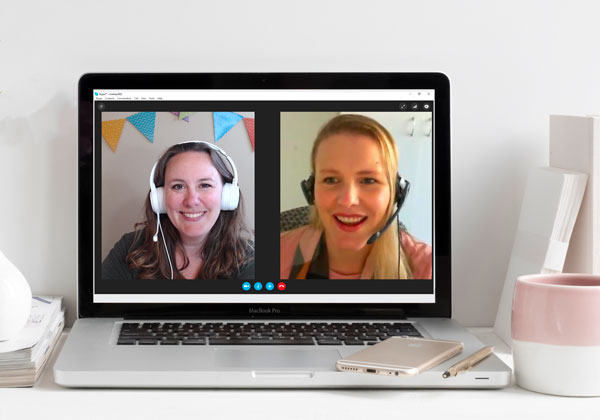
Here's why this is the time to step up and say "YES, I'm ready."
You want to record the best moments of your life.
You know that things get lost in the shuffle. Those moments you think will last forever disappear as phones, cameras and computers are upgraded.
You know that photos can be transient, they are fading in your albums and at risk without a good system to manage them.
You don't want to come away from an afternoon at the computer with nothing but frustration to show for it.
Tell me if this sounds familiar.
Your family is accruing photos at rapid speed -- on multiple devices. It's costing you an arm and a leg in $9.99/month payments because just you aren't sure which photos are doubles, how to download them all, and even how to get them all in one place. You've got so many treasured photos but when you scroll through your camera roll the sheer numbers make you give up in despair.
You've tried a handful of apps, have an external hard drive gathering dust and even print credits at your favourite photo lab. But you just haven't found the system that works for you.
Your kids are growing up with that same department store portrait in their room, your mother-in-law wants to know why you don't have any recent snaps to add to her brag book, and you'd like to remember that trip you took last year without having to scroll back 500 pages in your photos app. Sure, you should be able to enjoy your memories, but the tech just keeps tripping you up!
You know you would love be able to find your favorite photos, but it needs to be something easy to do and enjoyable. But right now every time you see your laptop, you secretly wonder if anyone would notice if you threw it out the window. . . it's all just so frustrating right now.
It doesn't have to be that way.

You can experience the joy of seeing a captive audience leafing through the pages of a beautiful book you’ve designed and printed just for them.
You can enjoy your photos and use them to keep those happy moments close to you and your family.
You can get your computer to do the heavy lifting - automatically importing, backing up and even tagging all your family photos, from all your devices.
Here are the 4 reasons you're not getting these photos under control.
1. The technology is just too confusing, you aren't quite sure who or what to put where and you are scared of accidentally deleting things!
You are a smart woman, capable of working this out. It's just that, all the jargon and the cloud, and the tech, all of it makes you want to slam the laptop shut like a moody teen.
You need someone to come alongside you, who can follow what you saying and work with you to create a simple, streamlined system for your photos.
2. It feels like I must be missing something!

It's frustrating when the simplest things trip you up, every time you want to fit a photo in a frame, you have to spend 30 minutes trying to work out how to print a photo at the right size and shape.
You need to know the essentials, the stuff that photo lovers need to get out of their software. You don't need the encyclopaedia of Photoshop, but you do need an instructor who knows what you don't, and who knows how to help you make it muscle memory.
3. When you take photos, you are stuck. You are just not sure what to do next, how to get them printed and shared with family.

After all, you want someone to see that creativity, even if it is just you. There's just something about flicking through a book you've made about your favorite memories. It's magical.
You need someone who had been-there-done-that and knows which company does what and how the whole system works. Someone to help create a perfect gift filled with cherished memories.
4. When you've finally got a system working, someone upgrades their phone, the camera dies or you need a new laptop.
Don't let the hiccups of life trip you up! If your technology is causing you problems.
What you need is an expert you can call on to help you tune up your specific system and keep right on creating pages.
Here's the good news: I'm here to set you up on the track to photo success!
I'm excited to introduce you to the Photo Rescue Program. This one-on-one coaching program for mastering the tech tools and processes in order to get your photos under control and in your life.
These coaching sessions are flexible, so you'll be learning just what you need, and how it works with your system.
You won't need to start from scratch, as I'll take your leads and help you deal with your most pressing questions and tech troubles.
Depending on where you are now, and what you want to achieve, I can help you with as little as $169 and as soon as this week!
Photo Rescue

- Two 45-minute sessions to fix your immediate tech frustrations!
- An automated system to manage your photos.
- Your questions answered.
- Session summary notes to refer back to whenever you need them.
Accounts
Free Trial
Projects
SSL
Storage
Domains
Sub-domains
PHOTO RESCUE
$199
Solve your tech frustrations - NOW!
Initial Assessment
2 45-minute sessions
One-on-One Coaching
Notes for your reference
Email support for 30 days
Purchase now and book sessions at your leisure within 1 year.
Meet Melissa
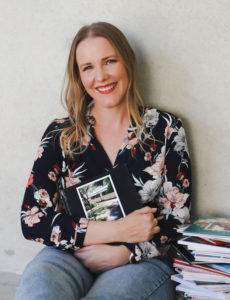
G’day, I’m Melissa, Aussie mum, professional organizer and digital scrapbooker. I love pairing photos with memories of meaningful moments in my everyday life.
Here in Perth, I spend my everyday life with my husband and family. Digital scrapbooking helps me tell the stories in our life. I love the versatility of digi scrapping. I can go simple, using phone photos and a line of journaling. Or, I can spend time in Photoshop Elements embellishing layouts with digital paint, flowers and bling.
At Digital Scrapbooking HQ, I would love to introduce you to the joy of scrapbooking with your computer. I've been teaching and working with Adobe Photoshop Elements for many years, and my career in education gives me the unique blend of skills needed to teach the technology skills, without the stress and fuss.
If you want help you're in the right place.
Why Learn with Melissa?
Melissa has many years of experience and natural talent for teaching. Here's what some successful scrapbookers have said about her teaching:
My frustration was high and I tried to fix my photo library myself but when I found a confused mess of file-paths and duplicates it became more stressful... It was great that Melissa was able to share my screen and control my mouse to improve the efficiency of the troubleshooting.
Melissa was able to provide a simple solution to something I’d spent three years getting frustrated over. This was money well spent!
- Sue W.
I've had a version of PSE on my computer for years and I just learned more in an hour than I have in four years. THANK YOU!!!
- Lorna S.
I really want to move forward with PSE, and you have given me the courage to do so... I think I will stick with you for additional training in this software!
- Renee T.
FAQs
What Happens Next?
Once you check out, you'll be sent to my private calendar where you can select the best time for us to meet.
I will confirm the booking, send you the initial assessment and a link to where we will meet. Don't worry, I'll walk you through the process.
You'll fill out the initial assessment so we are both on the same page when we begin our call.
I'll call you via Zoom and we can share screens and work through our time together.
How To Prepare
You'll need a computer with internet access.
We know how busy life can be so the best part is that this is an online remote service. That means you can get all this done while you remain in the comfort of your home! You can be in your pyjamas and don’t have to worry if the house is a little messy. We do all the work efficiently and effectively via remote methods such as phone, online remote access to your computer, screen sharing and email. And most importantly, I will gently GUIDE you through every step of the process
What will I receive?
- A recording of each live session.
- Priority email access - I'll help you via email between sessions.
What if I need more time?
I'm always happy to add extra live sessions to any package for a standard fee. We can work out the details in our initial discussions.
I can't wait to work with you!

PS Got questions? Email me! help@digiscraphq.com
Accounts
Free Trial
Projects
SSL
Storage
Domains
Sub-domains
PHOTO RESCUE
$199
Solve your tech frustrations - NOW!
Initial Assessment
2 45-minute sessions
One-on-One Coaching
Notes for your reference
Email support for 30 days