Would you like to have your computer automatically choose your best photos, open closed eyes and change the background of your photo to be exactly how you envisage? You can!
Each year Adobe releases a new version of Photoshop Elements and brings more features to our computers. This year Adobe also changed the naming to align with its other products, so this year's release is called Photoshop Elements 2018. As always, it's a one-off purchase and you can use the program for years to come without paying a monthly fee.
Read on to see the highlights of the new features.
New PSE Editor Features
Open Closed Eyes
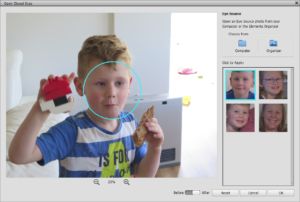
You've been asking for this!
Open Closed Eyes feature lets you correct closed eyes in your photos. I know we all have photos with 'crazy eyes' and we can finally, easily fix this problem. The tool works by using another picture of the same person from your computer or Elements Organizer catalog.
This new feature is available under Eye tool in the toolbar of the Quick and Expert modes, and in the Enhance menu as Open Closed Eyes. One of my favorites!
New Guided Edits
There are several new in Photoshop Elements 2018.
- The Watercolor guided edit lets you add a watercolor effect to your photos with texture and text effects.
- Double Exposure Earlier this year I hosted a webinar showing you the process of double exposure and now Adobe has made this easier than ever! Merge two photos or choose a preset to create surreal and abstract effect.
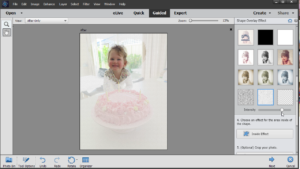 Shape Overlay makes it super easy to highlight one part of your image with a shape. You can customise the texture and effect both inside and outside the shape. This is perfect for scrapbookers wanting an easy way to blend and highlight their photos.
- Background Changer You have been asking for this one too! Select a background of your photo with one of the selection tools. You can then import a background or choose from presets, solid colors, or transparent background. A whole new look for your photo! (I demonstrated the manual way to do this in the webinar you can watch here)
Auto Selection
Once again Adobe is working to make selection easier. The Auto Selection is a selection tool based on deep learning technology. Once a user makes a rough selection, it snaps the object present inside the selection. The Auto Selection tool is available in the tools panel in Expert and Quick mode as well as in some of the guided edits, such as new Background Changer.
Photoshop Elements Organizer
We can't forget the Organizer, my favorite part of the program! It's easier than ever to import, organize and best of all find your photos.
Auto Curation
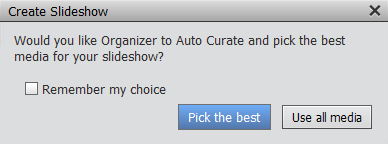
Auto Curation analyzes your catalog and curates the images based on their quality, faces present in them, smart tags, trips and events.
Memories
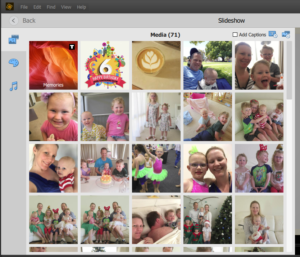
In Elements Organizer 2018, the Slideshow feature is rebuilt to introduce Memories. This feature allows you to relive your memories through beautiful creations with rich themes, text, and customizable audio background. You can add and trim videos while creating your Memories. You also can add multiple audio files and have the flexibility to change their sequence. All of your created Memories can be saved in Organizer as an editable project. You can export your Memories as a video file or you can share them online to Facebook, YouTube, or Vimeo. Use the integrated new feature - Smart Picks, that helps you quickly select your best photos more so that you can create amazing Memories in no time
The Smart Picks feature will help you quickly select your best photos so that you can create amazing Memories in no time!
I'll show you more about this new feature in our webinar!
Performance Improvements
Performance improvements are a big part of the this year's version. So if you have ever found Photoshop Elements slow or sluggish you'll be thrilled to see:
- Total time taken by Elements Organizer to get up and running has been reduced significantly.
- Scrolling experience: Smooth scrolling, both in Grid and Single Image views.
- Switching to the different views from the Media view and back is fast and effortless as compared to Elements Organizer 15.
Should You Upgrade?
Ah. the big question on everyone's lips. Of course, I can't make that decision for you, but generally, I recommend buying the latest edition of PSE when you get a new computer. Since you will need to move your catalog and all your files, it's a good time for a fresh start.
I also recommend upgrading when a new feature speaks to you!
Yes
- If you have an up-to-date PC and plan to use the Organizer to manage your photos (the new Organizer is so much faster!).
- If you like the sound of the new features like opening closed eyes!
No
- If you rarely use Photoshop Elements, have a computer 5 or more years old or less than 8Gb of RAM. You can continue to use the current version of PSE, as a new version may not be compatible with your older computer.
- If you bought Photoshop Elements 15, I don't see a compelling reason to upgrade unless you are a keen user of the Organizer.
What feature are you most excited about? Do you have questions about the new version? Leave them below.
Happy Scrapping!

I am an Amazon affiliate so may receive a commission if you make a purchase.


I’m excited to see how accurate the auto selection process is and how easy it is to adjust anything that is off in the selection. I have not used the Organizer for photos, as I have so many and they are in a good folder system. But this may make me change my mind if it can search thousands of photos easily. I’d like to hear more from your experience.
Oh absolutely! The organizer is so fabulous for searching by people, place or auto-tags. Great for when you can’t remember when you took a photo. Or for then and now type pages 😀