Is this you?

- You downloaded freebies
- You collected a few kits you loved
- You bought Photoshop Elements
- You open up the program...
AND FREEZE
Are you almost a digital scrapbooker?
Have you created one or two pages, and then got overwhelmed trying to remember how to do it the next time you sit down?
- Do you keep buying supplies and never quite get around to using them?
- Do you search YouTube for videos that never quite answer your questions.
- Does Photoshop Elements frustrate you?
You can create a page today!
It doesn't have to be complicated
 Join me as I take you step by step through what you want to know about Photoshop Elements and digital scrapbooking.
I've spent years honing my skills and months creating this set of tutorials, videos and ebooks that will get you digital scrapbooking.
In just 10 lessons you'll be a pro-scrapbooker with the skills to get your stories on paper without the frustration of battling against your computer.
Included is over 5 hours of video training, 35 pages of printable guides, plus a one on one Skype call with me to answer your trickiest questions!
I guide you through the process of:
-
-
- Getting started with digital scrapbooking
- Photoshop Elements basics to get you up and running
- Using templates to help you finish pages faster
- Organizing your supplies to get the most out of your digital scrapbooking stash
- Creating photobooks to share your pages with friends and family
- Sharing your work online
- and more!
-
This is not a long boring comprehensive Photoshop Elements manual.
I've taken years to learn the ins and outs of the program, and I've distilled it down into the essentials you need for digital scrapbooking.
No long boring documents to read, just helpful videos showing Photoshop Elements in Action and tutorials to support your learning.
I've spent months working on this course, making sure it will fit your needs and ensuring you will be up and running, creating pages right from the start.
What's included?
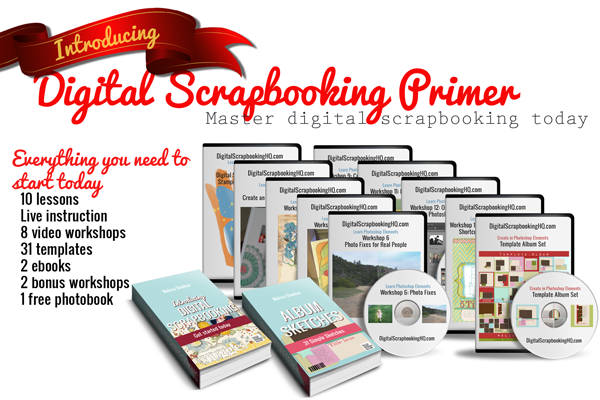
10 Lessons with practical tasks
-
-
- Lesson 1: Get Started
- Lesson 2: Templates
- Lesson 3: Techniques
- Lesson 4: Top Text Techniques
- Lesson 5: Scrap from Scratch
- Lesson 6: Organize your Supplies
- Lesson 7: Share your Layouts
- Lesson 8: Backup your Work!
- Lesson 9: Getting Advanced
- Lesson 10: Create an Album
- BONUS Lesson: Photo Editing
-
Each week you'll receive emails to prompt you to check out each lesson and get started on the bite sized task that goes along with it.
10+ Quick Start Video Tutorials
10+ video tutorials covering the basics of digital scrapbooking, using Photoshop Elements and Photoshop Elements Organizer.
5+ Intermediate Video Tutorials
Five more advanced videos including customizing embellishments, setting up photos for printing, and more.
Text Based Tutorials
Covering the basics of using Photoshop Elements and many of the techniques explained in the videos
Introducing Digital Scrapbooking eBook
My ebook that walks you through starting with Photoshop Elements and creating your first layout.
10 Workshops that show you the Essentials of Digital Scrapbooking
-
-
- Create a Digital Scrapbook Page using a Template: A great start if you are new to digital scrapbooking or want to expand your skills with templates.
- Photo Fixes for Real People: Four ways to make your photos shine.
- Scrapbooking Secrets: Cutting, Misting, Stamping and Inking Digital Style.
- Scrapbooking Shortcuts: Scrap faster with workflow tips, keyboard shortcuts, styles, actions and scripts.
- Top Ten Text Tips: My top tips for creative titles and journaling with the type tool
- Scrap from Scratch: How to create a page on your own without stressing over a blank canvas
- Organizing your Digital Scrapbooking Supplies: Easily find your supplies for speedy scrapbooking
- Create an Album from Templates: How I create great looking albums every time.
- Memorabilia: Two ways to add memorabilia to your digital scrapbook pages.
- Digital Gifts Workshop: Gift ideas using your digital scrapbooking stash.
- Create Cards and More with Photoshop Elements: How to create a unique masculine card with photo effects and how to create your own hybrid card.
Want more details of each workshop? Scroll to the bottom of this page!
-
One on One Lesson with Melissa
This is what makes the Digital Scrapbooking Primer stand head and shoulders above every other class online. You get one on one time with me!
We'll share screens and you'll get your questions answered on the spot.
This is an exclusive offer that I've not seen anywhere else in scrapbooking.
Usually you are left on your own. But not at Digital Scrapbooking HQ. I'll be here to hold your hand and help you overcome those stumbling blacks that hold you up.
How much will it cost?
The total value of the Digital Scrapbooking Primer is $325.
The 10 workshops included in the course are sold for $20 each - Your Digital Scrapbooking Primer includes all 10(valued at $200)
In my successful local digital scrapbooking classes I charge $129 for a 1.5hr in-person class. Your Digital Scrapbooking Primer includes a one on one class.
The Digital Scrapbooking Primer will only cost you $325.
Why learn with Melissa?
Melissa Shanhun is an accomplished digital scrapbooker, a True Scrap 3 instructor, and a natural teacher. She’s known for her ability to simplify complicated steps so anyone can create fantastic results!
- Lain Ehmann
I’ve been using my computer to create beautiful things for about 15 years now. I've spent 10 years working in graphic design using a variety of software systems including Photoshop and Photoshop Elements. I’ve also taught a University unit on presentation systems and graphic design for the past few years.
I’ve been focusing my skills on digital scrapbooking since October 2007, and I've been teaching in person classes in Perth, Western Australia since 2009. In 2011 I launched Digital Scrapbooking HQ, where I’m creating a unique system where you can get your Photoshop questions answered and you can use your computer to do what you want it to!
My work has been featured at The Daily Digi, Scrapbookgraphics, and the Daily Scrapper and was published in the 2012 Log your Memory Weekly Challenge Book. I’m currently on the team for Wendyzine Scraps and Ella Publishing.
What others have to say about Melissa
Don't take it from me, I have dozens of happy scrapbookers who love their finished pages...
"I just wanted to say that you have a great voice and energy to your tutorials. You make everything sound uncomplicated and easy to accomplish."
- Juanita M-S
"That helped me out big time. I am new to Photoshop Elements. Thanks."
- kdottosen112
Bonus!
To celebrate the launch of the Digital Scrapbooking Primer, I'll be giving an exclusive bonus to everyone who signs up for the Digital Scrapbooking Primer course:
-
-
- My Simple Template Album set (valued at $47) - to help you start creating your own pages
- My Photobook Perfection Workshop (value $17.99) - get you creating gorgeous photobooks today, even before you master Photoshop Elements
- My Finish What You Start Class (value $12.99) - to help you get projects finished
-
 Join Me and Start Scrapbooking Now
For 50% off the total value, you can have the one on one instruction you need and a library of scrapbooking instruction you'll return to again and again.
Soon you'll be kicking back and enjoying your freshly printed albums.
Join me and your fellow scrapbookers today!
Your Guarantee
30-day money back guarantee:
Still here? Here's the details of what's inside each workshop
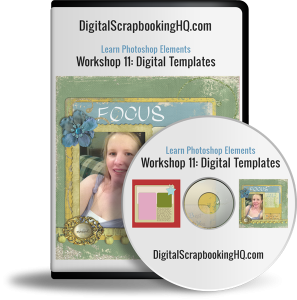
Create a Digital Scrapbook Page using a Template
Learn how to create pages you love in this introduction to digital scrapbooking in Photoshop Elements.
- Have you ever wondered how to create a digital scrapbook layout from a template?
- Would you like the tips on how to get your photos and elements looking great when the layout is complete
- Do you want to see how you can customize templates?
Photo Fixes for Real People
Go from bland to brilliant using just Photoshop Elements.
-
-
- Turn your overcast skies blue
- Clean away food from your baby’s face
- Create a perfect group shot – where everyone is smiling & has their eyes open!
- Get rid of red eyes.
-
I’ll teach you how to fix your photos using Photoshop Elements in less than 40 minutes
Digital Scrapbooking Secrets: Stamping, Misting and More
 Are you inspired by all the fun paper scrapbookers have with their misting, stamping, embossing and more?
Do you want to learn techniques to use them on a digital page?
Join me for a fun and (digitally) messy hour-long workshop! During this class you’ll have a chance to see digital techniques in action.
-
-
- Using paint on your pages
- Painting within selections
- Inking the edges of your paper
- Cutting your paper
- Creating a mist (various techniques)
- Creating your own custom brushes
- Stamping with the brush tool
-
Top Ten Text Tips
 Learn top techniques to give your titles and journaling a boost using Photoshop Elements
You will come away with:
- An understanding of how the type tool works in Photoshop Elements
- 10 ways to add style and creativity to text on your page
- High definition video recording
- Handout including the slides and links mentioned in the workshop
Scrap from Scratch
- Do you want to create a page without a template?
- Are you nervous about how to begin?
- Are you ready to take your scrapbooking to the next level?
Learn from me as I create a gorgeous page from scratch in under an hour.
You will come away with:
- An understanding of how to position your photos for best effect
- 3 strategies to overcome the fear of the blank canvas
- 3 guidelines to help your page look great
- Practical skills for creating your own layered scrapbook page in Photoshop Elements
Scrapbooking Shortcuts: Styles, Actions, Workflow and Keyboard Shortcuts
Frustrated as a slow scrapper? Want to be more comfortable in Photoshop Elements? I can help!
-
-
- Want to scrapbook more quickly?
- Want perfect photobooks every time?
- Tired of resizing to share online?
- Wish you knew all the insider shortcuts?
-
Join me to learn about shortcuts, scripts and actions that will get you finishing pages in no time!
 Organizing your Scrapbooking Supplies
Overwhelmed by Piles of Digital Scrapbooking Kits?
-
-
- Do you have piles of digital scrapbooking supplies?
- Do you have a mess of folders on your computer?
- Do you want to get organized quickly?
-
Join me to learn how to use Photoshop Elements Organizer to organise your digital scrapbooking supplies.
-
-
- Simple ways to organize your supplies - saving hours of your time!
- How to import your supplies into Photoshop Elements Organizer
- Time-saving, ready-made keyword tags to download
- Fast searching techniques that will help your complete layouts with the perfect supplies in no time!
-
This workshop includes:
-
-
- How to organize your digital scrapbooking supplies in Photoshop Elements Organizer
- All the links and handouts mentioned in the workshop
- BONUS Introduction to Photoshop Elements Organizer PDF
-
 Create a Digital Scrapbook Album using Templates
Come and watch as I walk you through:
- Planning an album
- Choosing templates to suit your style
- Organizing your templates in Photoshop Elements
- Rescuing half-finished projects
- Getting your album finished
Two Ways to Use Memorabilia on Digital Scrapbook Pages
 Do you have a little bit of life stuff you want to add to your digital scrapbook pages?
Maybe you were inspired by paper scrapbooks, but don’t know how you can implement it in the digital realm?
In this workshop, I’ll be showing you two ways you can use memorabilia on your digital scrapbook pages.
-
-
- A piece of scanned ephemera
- A photographed item
-
You will also receive a free template to help you complete a page using your memorabilia.
This hour-long workshop includes:
-
-
- How to import a page from a PDF file into your layout
- How to adjust the levels of a black and white drawing
- How to get your memorabilia to blend into your pages
- 4 ways to extract an image
- and a bonus tip on how to rid your house of clutter!!! Yes, really – watch and find out the tip!
-
Gifts: Create custom gifts with your digital scrapbooking supplies
I’ll teach you how to create custom gifts using Photoshop Elements.
I’ll have lots of gift ideas to show you, and I’ll be walking through the steps to create some of the other gifts and related gift giving fun!
Think photo collages, canvases, gift boxes, gift card holders, and more.
The workshop includes:
-
-
- Display of photo gifts/hybrid gifts
- Walk through and templates for a Calendar
- Tips on creating other gifts with your supplies
-
Cards and More
Join me to learn:
-
-
- How to scale you digital scrapbooking supplies to work on a card or poster
- Learn to alter your templates to fit your new page size
- Alter your photos for a modern look
- How to customize the size of your page
-
Join me and get scrapbooking today!
Leave a Reply