
I’m excited to share the news – Layout a Day 513 is open for registration! If you’ve not heard about Layout a Day, you are missing out. Lain Ehmann leads us through a month of daily scrapbooking with 31 days of brand-new video prompts and lessons, guaranteed to bust you out of any scrapbooking rut, bring a smile… [Continue reading]
Save $50 on RadLab today
Did you know that professional photographers do some sort of editing to every photo? Yes, it’s true. Now, I don’t suggest you edit every photo that way. But what if I shared with you the tool I use to take my favourite photos to the next level? What if it was a SIMPLE tool that… [Continue reading]
Everyday Storyteller 2 is on its way!
Last year Jennifer Wilson, of Simple Scrapper launched her collaborative idea book, Everyday Storyteller. I bought my own softcover copy and love looking through it when I need a burst of inspiration. But that’s not the end of the story. This year, Everday Storyteller 2 is coming This compilation from 30+ scrapbookers and storytellers will… [Continue reading]
How to move your photo library off Photoshop.com

Photoshop.com storage is changing to Revel. If you have been using the online storage at Photoshop.com. You may have a question similar to Teresa’s I have to move my Photoshop Elements library by 18 June 2013 because Photoshop.com storage is changing to Adobe Revel. Can I move my library to a USB memory stick? I… [Continue reading]
Use the Vertical Type Tool to create a Title in Photoshop Elements
So you create a title and rotate it 90 degrees. BUT if that’s not what you want! Watch this video to see how to create a truly vertical title. Watch a learn how to use the vertical type tool in Photoshop Elements.
Simplify Your Photo Processing
Would you like to make your photo processing simpler? Listen in and I’ll tell you how you can save time getting your photos off your camera which will leave you with more time for getting them onto your scrapbook pages. Links Learn More about Photo Freedom Learn how I use the Eye Fi Card Buy… [Continue reading]
Candid Kid Captures starting soon

Congratulations to Laurie our winner of the Candid Kid Captured giveaway. I’ve just emailed her access to the class, but there’s still a few days to register, so jump over and register today. As a mum, I love to have gorgeous photos our our little ones around the house and in my scrapbook pages. But, as I’m… [Continue reading]
$50 off Photoshop & Premiere Elements 11 today only!

Save $50 off Photoshop & Premiere Elements 11 ! One Day Only! Save $50 on Adobe Photoshop Elements & Premiere Elements Bundle. Enter code: ONEDAYDEAL Buy today and you can enjoy a new lighter inteface, much improved Organizer text on a path, quick photo fixes, masking and more. PLUS you’ll have the Premiere Elements video editing… [Continue reading]
How to Write Metadata in Photoshop Elements Organizer
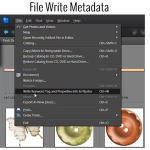
It’s easy to save your work and write your metadata to file in Photoshop Elements [Continue reading]
Clip your Paper or Photo to Any Shape in Photoshop Elements
Inside this video, I’ll show you my absolute favourite scrapbooking technique that I used in every layout I create: Clipping masks. Clipping masks are a non-desctructive way to ‘cut out’ your photo. Plus it’s the easy way to use a digital scrapbooking template. You just lay your photo or paper on top of a layer… [Continue reading]
- « Previous Page
- 1
- …
- 132
- 133
- 134
- 135
- 136
- …
- 164
- Next Page »