Digital Scrapbooking HQ

Learn to Scrapbook Using Your Computer

  • Blog
  • Classes
  • Book Melissa
  • About
  • Contact

How to use Color Swatches in Photoshop Elements

February 10, 2016 By Melissa Shanhun 3 Comments

Have you seen color swatches?

Not sure how to use .aco and .ase files?

Here's the scoop!
Have you seen color swatches? Not sure how to use .aco and .ase files? Here's the scoop! #digiscrap #scrapbooking

There are two types of swatch files: Adobe Photoshop Colour files (aco) and Adobe Swatch Exchange

  • You can select and save favourite colours to reuse in your layouts or when designing a kit.
  • You can generate swatches from your photos at Big Huge Labs (Thanks Katie for the tip!)
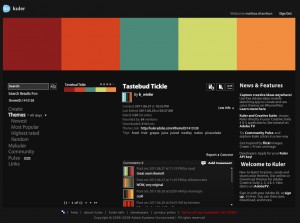
  • You can download swatches in colour schemes you like from Kuler.

If you are looking for more colour inspiration, there’s a lot of chat about colour schemes over in the comments at the Paperclipping DigiShow Episode 20.

Quick tip: You can open a ACO or ASE file using the File > Open command and it will be instantly added to the end of your current colour swatch

You can save and use custom swatch libraries via the Preset Manager. I use that to save out individual swatches using the Save set button. Watch the video for more details!

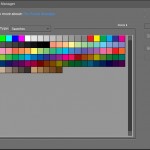
You can manage the swatches using the Color Swatches panel – get to it by clicking Window > Colour Swatches.

  • To save a library of swatches, choose Save Swatches from the More menu. To make the set appear in the panel’s swatch libraries pop?up menu, save the file to the Photoshop Elements\Your Version\Presets\Color Swatches folder (that’s the default folder that opens). To see the new swatch set in the menu, you must restart Photoshop Elements.
  • To select and load a swatch library, choose Load Swatches from the More menu in the panel.
  • To replace the current swatch library with a different library, choose Replace Swatches from the More menu in the panel and select a library.

You can also load ASE (Adobe Swatch Exchange) files into Photoshop Elements, I demonstrated this using Tastebud Tickle from Kuler and Big Huge Labs palette generator.
Have you seen color swatches? Not sure how to use .aco and .ase files? Here's the scoop! #digiscrap #scrapbooking
Adobe kuler - Tastebud Tickle colour scheme

Here’s a little swatch I created for you to play around with Album swatch

Have you ever used colour swatches?

Melissa1
See my favourite things in the Digi Scrap HQ Store at Amazon.

I am an Amazon affiliate so may receive a commission if you make a purchase.

Filed Under: Digital Scrapbooking, Tutorials Tagged With: color swatches

About Melissa Shanhun

Melissa Shanhun is a Aussie mum of four and avid digital scrapbooker. She loves to show others how fun and easy it can be to record your precious memories with tech tools like Photoshop Elements.

Comments

  1. spenny says

    July 7, 2016 at 4:04 am

    link to Album Color Swatches is not working 🙁 Learned alot from your video !!! Thanks for sharing :).

    Reply
    • Melissa Shanhun says

      July 8, 2016 at 11:36 am

      Sorry! I’ve fixed the link now!

      Reply
      • spenny says

        July 11, 2016 at 12:51 pm

        Thanks !! Got it 🙂
        Thanks for the great info on this topic.

        Reply

Leave a Reply Cancel reply

Your email address will not be published. Required fields are marked *

G’day! I’m Melissa


G’day, I’m Melissa, Aussie mum and digital scrapbook educator. I'm here to help you pair your photos with memories (and fun supplies!) and create your own photo books.
Click Here to Get Started

Search

Youtube

Join us on Facebook

On the Site

ABCs of PSE Adobe Photoshop Adobe Photoshop Elements affiliate Ali Edwards Becky Higgins Christmas Christmas Album Christmas layout ideas Christmas scrapbook Crafts December Daily December Daily Inspiration December Down Under Digital Scrapbook digital scrapbooking digital scrapbook pages Forever giveaway Holiday Faves interview keyboard shortcuts Lain Ehmann Nettio Designs photobook photobooks photo books photo editing Photoshop Photoshop Elements Photoshop Elements Organizer Podcast project life Project Life app PSE13 PSE2021 Scrapbook Scrapbooking Shutterfly templates tools Tutorial tutorials Week in the Life Workshop

Copyright © 2026 Melissa Shanhun 2011-2023

I wish to acknowledge the traditional custodians of the land I live and work on, the Whadjuk (Perth region) people. I acknowledge and respect the continuing Noongar culture and the contribution they make to the life of this city and this region.

Privacy policy

As an Amazon Associate I may earn from qualifying purchases.

We use cookies on our website to give you the most relevant experience by remembering your preferences and repeat visits. By clicking “Accept”, you consent to the use of ALL the cookies.
Do not sell my personal information.
Cookie SettingsAccept
Manage consent

Privacy Overview

This website uses cookies to improve your experience while you navigate through the website. Out of these, the cookies that are categorized as necessary are stored on your browser as they are essential for the working of basic functionalities of the website. We also use third-party cookies that help us analyze and understand how you use this website. These cookies will be stored in your browser only with your consent. You also have the option to opt-out of these cookies. But opting out of some of these cookies may affect your browsing experience.
Necessary
Always Enabled
Necessary cookies are absolutely essential for the website to function properly. These cookies ensure basic functionalities and security features of the website, anonymously.
CookieDurationDescription
cookielawinfo-checkbox-analytics11 monthsThis cookie is set by GDPR Cookie Consent plugin. The cookie is used to store the user consent for the cookies in the category "Analytics".
cookielawinfo-checkbox-functional11 monthsThe cookie is set by GDPR cookie consent to record the user consent for the cookies in the category "Functional".
cookielawinfo-checkbox-necessary11 monthsThis cookie is set by GDPR Cookie Consent plugin. The cookies is used to store the user consent for the cookies in the category "Necessary".
cookielawinfo-checkbox-others11 monthsThis cookie is set by GDPR Cookie Consent plugin. The cookie is used to store the user consent for the cookies in the category "Other.
cookielawinfo-checkbox-performance11 monthsThis cookie is set by GDPR Cookie Consent plugin. The cookie is used to store the user consent for the cookies in the category "Performance".
viewed_cookie_policy11 monthsThe cookie is set by the GDPR Cookie Consent plugin and is used to store whether or not user has consented to the use of cookies. It does not store any personal data.
Functional
Functional cookies help to perform certain functionalities like sharing the content of the website on social media platforms, collect feedbacks, and other third-party features.
Performance
Performance cookies are used to understand and analyze the key performance indexes of the website which helps in delivering a better user experience for the visitors.
Analytics
Analytical cookies are used to understand how visitors interact with the website. These cookies help provide information on metrics the number of visitors, bounce rate, traffic source, etc.
Advertisement
Advertisement cookies are used to provide visitors with relevant ads and marketing campaigns. These cookies track visitors across websites and collect information to provide customized ads.
Others
Other uncategorized cookies are those that are being analyzed and have not been classified into a category as yet.
SAVE & ACCEPT