Digital Scrapbooking HQ

Learn to Scrapbook Using Your Computer

  • Blog
  • Classes
  • Book Melissa
  • About
  • Contact

Project Life for Memorabilia

October 2, 2014 By Melissa Shanhun 2 Comments

Learn how to use Project Life to document your memorabilia! #digiscrap #scrapbooking #digital

I was so thrilled when Noell Hyman invited me to join in the latest Paperclipping Roundtable discussion about Project Life. I've been a fan of Paperclipping for at least 5 years now. I always wanted to be part of the PRT panel, and it was fun to be on with Peppermint Granberg. Peppermint's gorgeous pages are pure eye candy, so be sure to check them out.

https://media.blubrry.com/scrapobookingpodcast/traffic.libsyn.com/secure/digitalscrapbooking/Paperclipping_Round_Table_Project_Life_prt224_ccr.mp3

Podcast: Play in new window | Download (91.7MB)

Subscribe: RSS

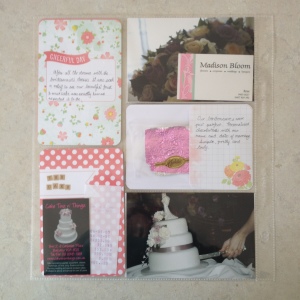
Here are some photos of the specific wedding pages Noell was speaking with me about:
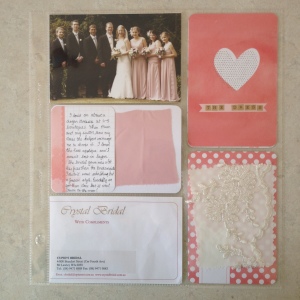
Learn how to use Project Life to document your memorabilia! #digiscrap #scrapbooking #digitalLearn how to use Project Life to document your memorabilia! #digiscrap #scrapbooking #digital

And I have to show you the 'tiara' too!
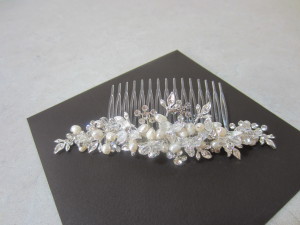
Learn how to use Project Life to document your memorabilia! #digiscrap #scrapbooking #digital

A look through my album

I recorded a quick video look through my album just to help you see what I've created.

Things look a little messy, but the digi 12x12 prints will really help give your eye a rest from busy pockets.

Now, I must get onto printing.

My process

  1. Purge - go through an throw out what I don't want to keep
  2. Place - lay the memorabilia out and work out how to arrange it
  3. Protectors - choose a page protectror that works
  4. Provenance - yes, I just got all archivey on you! I use journal cards and thickers/letter stickers to note the date and relevance of the items I'm keeping

What I love

As a digi gal, I love flexiblility and with pocket pages I don't have to glue anything! Unless I want to, of course. It's quick and flexible if I find more stuff to add later I can always move things around to fit them in.

I've filled all these albums since the beginning of the year:
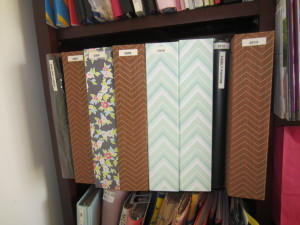
Learn how to use Project Life to document your memorabilia! #digiscrap #scrapbooking #digital

I just keep my memorabilia in enveloped by date. Big stuff is in a nice Kikki.K A3 box.
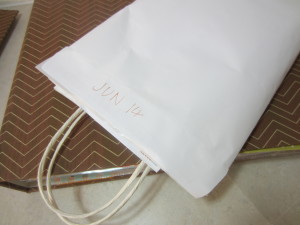
Learn how to use Project Life to document your memorabilia! #digiscrap #scrapbooking #digital

My current envelope started in June 2014, I'll try to put that straight into an album soon

I hope to empty this shelf and have only one box of memorabilia on the go at any time.
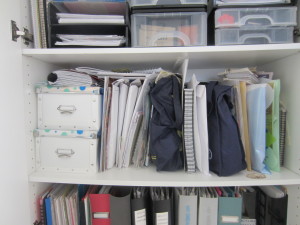
Learn how to use Project Life to document your memorabilia! #digiscrap #scrapbooking #digital

This is the 2007-2014 memorabilia shelf *after* all those albums were filled!

The Limitations

The downsides are definitely the dimensions of the 12x12 albums which don't line up with a4 sizes well.
I use some A4, A5 and CD protectors from the office supply stores, but they just aren't as crystal clear as the scrapbooking ones. But I'm making progress!

Pick of the Week: Design L

Learn how to use Project Life to document your memorabilia! #digiscrap #scrapbooking #digital

Photo Pocket Pages – Design L

I am always trying to fit my metric life into inches! Becky Higgins Design L page protectors are just simple vertical 6x4s but they load vertically, so trifold A4 fits like a glove!
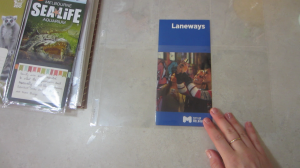
Learn how to use Project Life to document your memorabilia! #digiscrap #scrapbooking #digital

Design L Page protector in action - see video above for more

What about Digi Project Life?

I briefly explained to Izzy how PL can work in digital form - here's a tutorial that shows you what I meant.

So, do you scrap your memorabilia? Inquiring minds want to know!

Get your Photos Organized
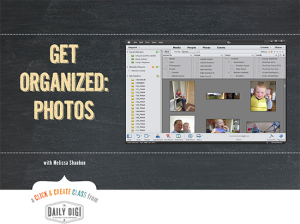
Learn how to use Project Life to document your memorabilia! #digiscrap #scrapbooking #digitalI mentioned my class at the Daily Digi in the episode too - here's the link. I walk you through 15 minute challenges to gather and organize ALL your photos. I'll even help you locate and download those pesky phone photos.

THANK YOU So MUCH by watching this tutorial you have saved me so many hours of painstaking tagging and wow it can be done fast. I like you have 36000 items and didn’t know where to begin but so glad I watched your video. Looks easy to tag now and not a hated job I left for so long Also have more time to scrap so that’s gotta be a great thing ay. FANTASTIC VIDEO !!! – Tracy

Melissa, thank you so much for presenting this Organizing class. I had a very poor understanding of what I could do with PSE Organizer and I was overwhelmed when trying to locate a particular photo among thousands. Your clear cut directions have made it easy for me to get control of my photos and confident that I can locate the photo I want when I need it. – Jan

Happy Scrapping!

Melissa1

PS Here's the episode!

See my favourite things in the Digi Scrap HQ Store at Amazon.

I am an Amazon affiliate so may receive a commission if you make a purchase.

Filed Under: Digital Scrapbooking Tagged With: Izzy Hyman, memorabilia, Noell Hyman, Paperclipping Roundtable, Peppermint Granberg, project life

About Melissa Shanhun

Melissa Shanhun is a Aussie mum of four and avid digital scrapbooker. She loves to show others how fun and easy it can be to record your precious memories with tech tools like Photoshop Elements.

Comments

  1. Julie Tann says

    July 9, 2017 at 3:14 pm

    Brill ideas & great video.

    I love how you’ve included so many of the special memories in your wedding album, great idea:)

    Reply
    • Melissa Shanhun says

      July 9, 2017 at 5:34 pm

      🙂 thanks Julie! I appreciate you taking the time to comment 🙂

      Reply

Leave a Reply Cancel reply

Your email address will not be published. Required fields are marked *

G’day! I’m Melissa


G’day, I’m Melissa, Aussie mum and digital scrapbook educator. I'm here to help you pair your photos with memories (and fun supplies!) and create your own photo books.
Click Here to Get Started

Search

Youtube

Join us on Facebook

On the Site

ABCs of PSE Adobe Photoshop Adobe Photoshop Elements affiliate Ali Edwards Becky Higgins Christmas Christmas Album Christmas layout ideas Christmas scrapbook Crafts December Daily December Daily Inspiration December Down Under Digital Scrapbook digital scrapbooking digital scrapbook pages Forever giveaway Holiday Faves interview keyboard shortcuts Lain Ehmann Nettio Designs photobook photobooks photo books photo editing Photoshop Photoshop Elements Photoshop Elements Organizer Podcast project life Project Life app PSE13 PSE2021 Scrapbook Scrapbooking Shutterfly templates tools Tutorial tutorials Week in the Life Workshop

Copyright © 2026 Melissa Shanhun 2011-2023

I wish to acknowledge the traditional custodians of the land I live and work on, the Whadjuk (Perth region) people. I acknowledge and respect the continuing Noongar culture and the contribution they make to the life of this city and this region.

Privacy policy

As an Amazon Associate I may earn from qualifying purchases.

We use cookies on our website to give you the most relevant experience by remembering your preferences and repeat visits. By clicking “Accept”, you consent to the use of ALL the cookies.
Do not sell my personal information.
Cookie SettingsAccept
Manage consent

Privacy Overview

This website uses cookies to improve your experience while you navigate through the website. Out of these, the cookies that are categorized as necessary are stored on your browser as they are essential for the working of basic functionalities of the website. We also use third-party cookies that help us analyze and understand how you use this website. These cookies will be stored in your browser only with your consent. You also have the option to opt-out of these cookies. But opting out of some of these cookies may affect your browsing experience.
Necessary
Always Enabled
Necessary cookies are absolutely essential for the website to function properly. These cookies ensure basic functionalities and security features of the website, anonymously.
CookieDurationDescription
cookielawinfo-checkbox-analytics11 monthsThis cookie is set by GDPR Cookie Consent plugin. The cookie is used to store the user consent for the cookies in the category "Analytics".
cookielawinfo-checkbox-functional11 monthsThe cookie is set by GDPR cookie consent to record the user consent for the cookies in the category "Functional".
cookielawinfo-checkbox-necessary11 monthsThis cookie is set by GDPR Cookie Consent plugin. The cookies is used to store the user consent for the cookies in the category "Necessary".
cookielawinfo-checkbox-others11 monthsThis cookie is set by GDPR Cookie Consent plugin. The cookie is used to store the user consent for the cookies in the category "Other.
cookielawinfo-checkbox-performance11 monthsThis cookie is set by GDPR Cookie Consent plugin. The cookie is used to store the user consent for the cookies in the category "Performance".
viewed_cookie_policy11 monthsThe cookie is set by the GDPR Cookie Consent plugin and is used to store whether or not user has consented to the use of cookies. It does not store any personal data.
Functional
Functional cookies help to perform certain functionalities like sharing the content of the website on social media platforms, collect feedbacks, and other third-party features.
Performance
Performance cookies are used to understand and analyze the key performance indexes of the website which helps in delivering a better user experience for the visitors.
Analytics
Analytical cookies are used to understand how visitors interact with the website. These cookies help provide information on metrics the number of visitors, bounce rate, traffic source, etc.
Advertisement
Advertisement cookies are used to provide visitors with relevant ads and marketing campaigns. These cookies track visitors across websites and collect information to provide customized ads.
Others
Other uncategorized cookies are those that are being analyzed and have not been classified into a category as yet.
SAVE & ACCEPT