Digital Scrapbooking HQ

Learn to Scrapbook Using Your Computer

  • Blog
  • Classes
  • Book Melissa
  • About
  • Contact

Text on a Shape in Photoshop Elements

February 5, 2018 By Melissa Shanhun Leave a Comment

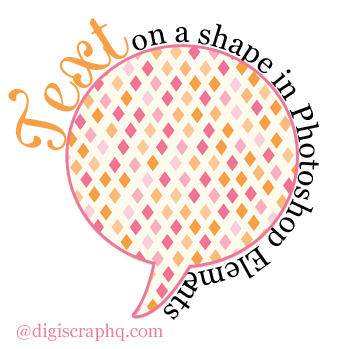
Text on a shape in Photoshop ELements
Credits: Becky Higgins Project Life Baby For Her

Photoshop Elements provides a variety of tools you can use to spruce up the text on your scrapbook page. Learn how to use Text on a Shape!

We've previously looked at:
  • Text on a Path in Photoshop Elements
  • Text Inside a Shape in Photoshop Elements
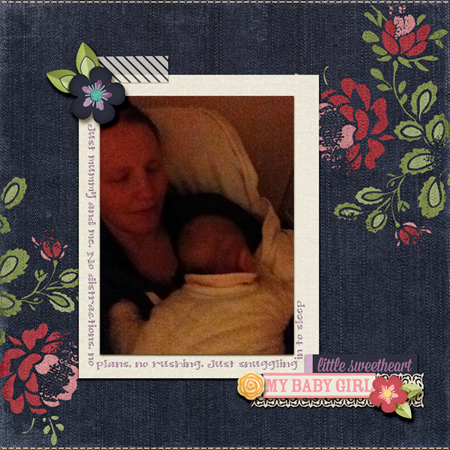
Credits: Studio Flergs and Sugarplum Paperie My Sweet Girl

Today, we'll look at another feature of Photoshop Elements, text on a shape.

Text on a shape is perfect for creating journaling around the edge of a photo or page, as well as putting text along the outline of a shape.

Step by Step

  1. Select the Type tool (Shortcut key: T)Type tool icon
  2. Select the shape you want your text to be from the tool options:

    Text on a shape tool options Adobe Photoshop Elements
  3. Draw your shape.
  4. Mouse over the shape until your cursor changes to this icon: Text on a path icon
  5. Click once where you want your text to begin.
  6. Type your text, it will automatically follow the outline of the shape.
  7. Press Enter or click the green checkmark/tick Green checkmark to apply changes to apply the changes.

Text on the Inside

As you create your text on a shape, by default it will go around the outside of your shape.

To make the text run on the inside of your shape, or change the start point:

  1. Double click on your text to edit it.
  2. Hold down your Control key (Cmd key on a Mac) and drag the little X at the start of your line of text.
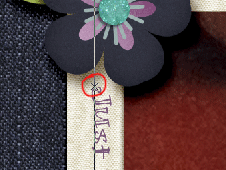
    Text starting pointYour mouse pointer will change to look like this: I beam arrow left or this I beam arrow right to show you which way the text will run.

What about Photoshop?

In Photoshop, just create any shape using the shape tool and add type by mousing over the shape until your cursor changes to this icon:
Text on a path icon

But I need a different shape!

In Photoshop Elements, you are limited to only a handful of shapes you can use with text on a shape. In my next post, I'll be showing you how you can use text on a selection so that you can create text to follow the outline of anything on your page.

What's your favorite creative way to use text on a scrapbook page?
Melissa signature
See my favourite things in the Digi Scrap HQ Store at Amazon.

I am an Amazon affiliate so may receive a commission if you make a purchase.

Filed Under: Digital Scrapbooking Tagged With: text on a shape

About Melissa Shanhun

Melissa Shanhun is a Aussie mum of four and avid digital scrapbooker. She loves to show others how fun and easy it can be to record your precious memories with tech tools like Photoshop Elements.

Leave a Reply Cancel reply

Your email address will not be published. Required fields are marked *

G’day! I’m Melissa


G’day, I’m Melissa, Aussie mum and digital scrapbook educator. I'm here to help you pair your photos with memories (and fun supplies!) and create your own photo books.
Click Here to Get Started

Search

Youtube

Join us on Facebook

On the Site

ABCs of PSE Adobe Photoshop Adobe Photoshop Elements affiliate Ali Edwards Becky Higgins Christmas Christmas Album Christmas layout ideas Christmas scrapbook Crafts December Daily December Daily Inspiration December Down Under Digital Scrapbook digital scrapbooking digital scrapbook pages Forever giveaway Holiday Faves interview keyboard shortcuts Lain Ehmann Nettio Designs photobook photobooks photo books photo editing Photoshop Photoshop Elements Photoshop Elements Organizer Podcast project life Project Life app PSE13 PSE2021 Scrapbook Scrapbooking Shutterfly templates tools Tutorial tutorials Week in the Life Workshop

Copyright © 2026 Melissa Shanhun 2011-2023

I wish to acknowledge the traditional custodians of the land I live and work on, the Whadjuk (Perth region) people. I acknowledge and respect the continuing Noongar culture and the contribution they make to the life of this city and this region.

Privacy policy

As an Amazon Associate I may earn from qualifying purchases.

We use cookies on our website to give you the most relevant experience by remembering your preferences and repeat visits. By clicking “Accept”, you consent to the use of ALL the cookies.
Do not sell my personal information.
Cookie SettingsAccept
Manage consent

Privacy Overview

This website uses cookies to improve your experience while you navigate through the website. Out of these, the cookies that are categorized as necessary are stored on your browser as they are essential for the working of basic functionalities of the website. We also use third-party cookies that help us analyze and understand how you use this website. These cookies will be stored in your browser only with your consent. You also have the option to opt-out of these cookies. But opting out of some of these cookies may affect your browsing experience.
Necessary
Always Enabled
Necessary cookies are absolutely essential for the website to function properly. These cookies ensure basic functionalities and security features of the website, anonymously.
CookieDurationDescription
cookielawinfo-checkbox-analytics11 monthsThis cookie is set by GDPR Cookie Consent plugin. The cookie is used to store the user consent for the cookies in the category "Analytics".
cookielawinfo-checkbox-functional11 monthsThe cookie is set by GDPR cookie consent to record the user consent for the cookies in the category "Functional".
cookielawinfo-checkbox-necessary11 monthsThis cookie is set by GDPR Cookie Consent plugin. The cookies is used to store the user consent for the cookies in the category "Necessary".
cookielawinfo-checkbox-others11 monthsThis cookie is set by GDPR Cookie Consent plugin. The cookie is used to store the user consent for the cookies in the category "Other.
cookielawinfo-checkbox-performance11 monthsThis cookie is set by GDPR Cookie Consent plugin. The cookie is used to store the user consent for the cookies in the category "Performance".
viewed_cookie_policy11 monthsThe cookie is set by the GDPR Cookie Consent plugin and is used to store whether or not user has consented to the use of cookies. It does not store any personal data.
Functional
Functional cookies help to perform certain functionalities like sharing the content of the website on social media platforms, collect feedbacks, and other third-party features.
Performance
Performance cookies are used to understand and analyze the key performance indexes of the website which helps in delivering a better user experience for the visitors.
Analytics
Analytical cookies are used to understand how visitors interact with the website. These cookies help provide information on metrics the number of visitors, bounce rate, traffic source, etc.
Advertisement
Advertisement cookies are used to provide visitors with relevant ads and marketing campaigns. These cookies track visitors across websites and collect information to provide customized ads.
Others
Other uncategorized cookies are those that are being analyzed and have not been classified into a category as yet.
SAVE & ACCEPT